Sitebulb Review 2026
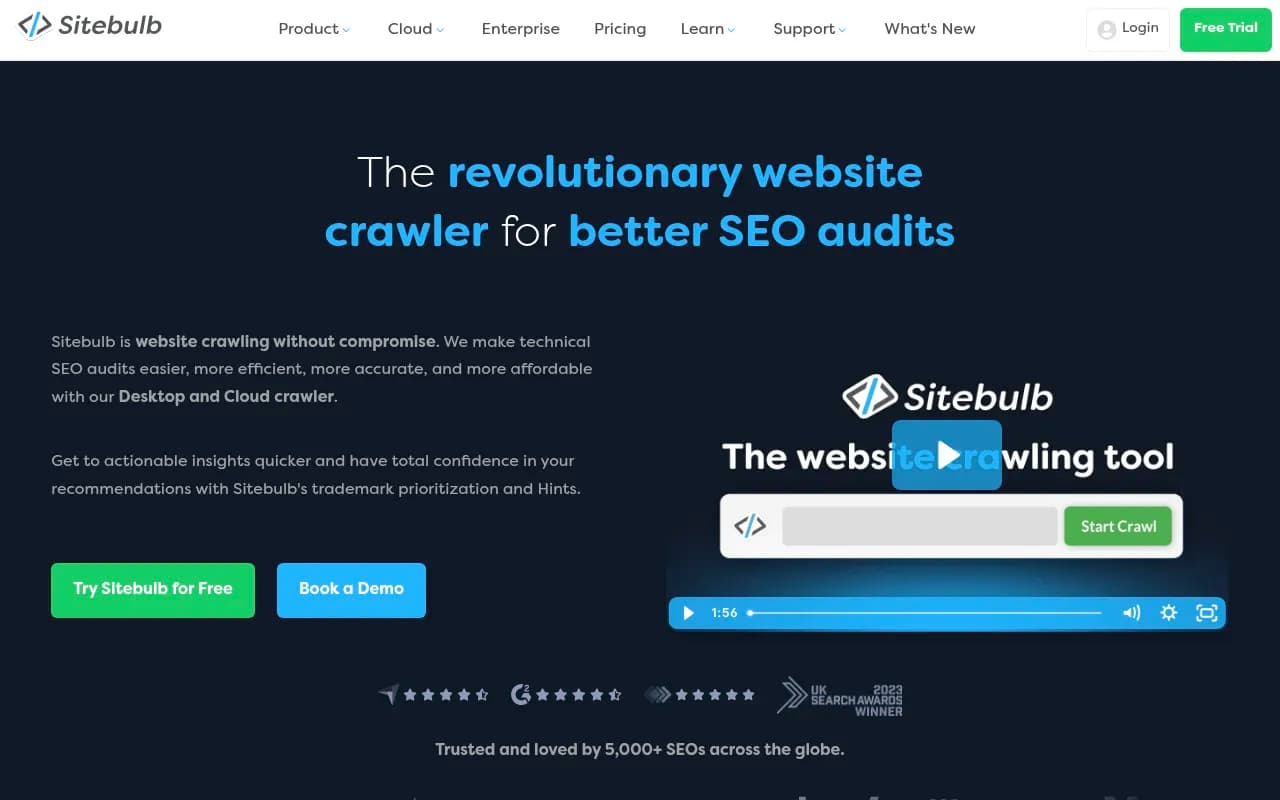
Sitebulb is a comprehensive website crawler for technical SEO audits, offering both desktop and cloud versions. Used by 5,000+ SEO professionals at agencies like Amazon, Mailchimp, and Yahoo, it crawls up to 10 million URLs, automatically checks 300+ SEO issues with prioritized recommendations, and
Key Takeaways
- Desktop + Cloud flexibility: Choose between local crawling (up to 500k URLs) or cloud-based audits (up to 10m URLs) depending on your scale and team needs
- Automatic prioritization: 300+ SEO issues automatically checked and ranked by importance, so you focus on what actually moves the needle
- Client-friendly output: Visual reports, copy-pasteable explanations, and customizable PDFs that stakeholders can actually understand
- Real team collaboration: Cloud version lets multiple users work from the same crawl data simultaneously, no more version control nightmares
- Honest limitations: Desktop version caps at 500k URLs per audit; cloud pricing starts at $125/month which may be steep for solo freelancers
Sitebulb is a technical SEO crawler built by a UK-based team that's been winning industry awards since launch. It's designed around a specific philosophy: technical SEO audits shouldn't just dump data on you -- they should guide you from discovery to prioritization to client communication. The tool comes in two flavors: Desktop (local crawling on your machine) and Cloud (browser-based crawling at scale). Both share the same core feature set but differ in crawl limits and collaboration capabilities.
The company has carved out a niche by focusing on what happens after the crawl finishes. Most crawlers give you raw data and leave you to figure out what matters. Sitebulb automatically scores and prioritizes every issue it finds, explains why it matters in plain language, and generates visual reports that clients can understand without a technical SEO degree. It's used by 5,000+ SEO professionals including teams at Amazon, Mailchimp, Yahoo, and Macy's.
Core Crawling Capabilities
Sitebulb Desktop crawls up to 500,000 URLs per audit. That's enough for most mid-sized sites and many enterprise properties. The crawler handles JavaScript rendering natively with no extra cost -- you're not paying per JS crawl like some competitors. It respects robots.txt, handles redirects intelligently, and can crawl via sitemaps or follow links organically.
Sitebulb Cloud removes the 500k ceiling entirely. You can crawl up to 10 million URLs per audit, and there are no project limits. The crawl happens on their servers, so your laptop's specs don't matter. You access everything through your browser, but you can also connect via the desktop app if you prefer that interface. Crawl speed is significantly faster than desktop because you're not limited by your machine's resources.
Both versions support custom crawl configurations: user-agent spoofing, custom headers, authentication, URL rewriting, crawl speed throttling, and regex-based URL inclusion/exclusion rules. You can pause and resume crawls. You can schedule recurring crawls in Cloud to monitor changes over time.
The 300+ SEO Issue Library
This is where Sitebulb differentiates itself. It checks for over 300 specific SEO issues across categories like crawlability, indexability, internal linking, page speed, structured data, hreflang, canonicalization, redirects, and content quality signals. Each issue gets automatically assigned a priority level (Critical, High, Medium, Low) based on how many URLs are affected and how severe the problem is.
For example: "URLs blocked by robots.txt" gets flagged as Critical if it affects important pages. "Missing H1 tags" might be Medium priority. "Images without alt text" could be Low if it's only a handful of decorative images. The prioritization isn't just counting issues -- it's weighing impact.
Every issue comes with a "Hint" -- Sitebulb's term for the explanation panel. Hints describe what the issue is, why it matters for SEO, how to verify it's actually a problem, and how to fix it. The language is written for humans, not robots. You can copy-paste these explanations directly into client reports or Slack messages. The Hints library is also available as a standalone resource on their website, so you can reference specific issues even without running a crawl.
Visual Data Presentation
Sitebulb leans heavily on data visualization. The interface shows you:
- URL Explorer: A spreadsheet-like view of all crawled URLs with filterable columns for status codes, word count, load time, internal links, etc. You can export any filtered view to CSV.
- Site Structure graphs: Visual maps of how pages link to each other, with depth and link equity flow. Helps you spot orphaned pages or over-linked sections.
- Crawl Tree diagrams: Shows the path the crawler took to discover each URL. Useful for debugging indexation issues.
- Issue distribution charts: Bar graphs and pie charts showing how issues are distributed across the site.
- Page Speed waterfall charts: Visual breakdowns of what's slowing down specific pages.
These aren't just pretty pictures -- they're interactive. Click a node in the site structure graph and it filters the URL list to show only those pages. Click a bar in an issue chart and it drills down to the affected URLs. This makes investigation much faster than scrolling through spreadsheets.
PDF Reporting
Sitebulb generates customizable PDF reports that are genuinely client-friendly. You can choose which sections to include, add your agency branding, write custom executive summaries, and annotate specific issues with your own notes. The reports include the same visualizations from the app, plus tables of affected URLs and fix recommendations.
The PDFs are designed to be standalone documents. A client can read one without needing access to the Sitebulb interface or technical SEO knowledge. This is a huge time-saver for agencies that bill for audit reports -- you're not spending hours in Google Slides recreating charts.
Integrations
Sitebulb Cloud integrates with Google Analytics and Google Search Console to pull in traffic and performance data. You can see which crawled URLs are actually getting traffic, which ones are indexed, and which ones have search visibility. This context helps prioritize fixes -- a broken page with zero traffic is less urgent than one driving 10k monthly visits.
There's also a Google Sheets integration for exporting data, and a Looker Studio connector for building custom dashboards. The API is available for Enterprise Cloud customers who want to build custom workflows or integrate Sitebulb data into their own tools.
Sitebulb Desktop vs Cloud: Which to Choose
Sitebulb Desktop is ideal for:
- Solo consultants or small agencies (1-3 people)
- Sites under 500k URLs
- Teams that don't need real-time collaboration
- Anyone who prefers local data storage
Pricing starts at $35/month for a single user (Lite plan, up to 5k URLs per audit). The Pro plan is $65/month (up to 500k URLs). Agency plans add multiple user seats. There's a 14-day free trial with no credit card required. You can cancel anytime.
Sitebulb Cloud is ideal for:
- Agencies with distributed teams
- Enterprise sites over 500k URLs
- Teams that need multiple people working from the same crawl data
- Anyone who wants scheduled recurring crawls
Cloud pricing starts at $125/month for the Mini plan (2 users, up to 1m URLs per audit). Small plan is $245/month (5 users, 2m URLs). Medium is $495/month (10 users, 5m URLs). Enterprise is custom pricing for 10+ users and up to 10m URLs per audit. All Cloud plans include unlimited projects -- no artificial limits on how many sites you can audit. Desktop is included with every Cloud plan, so you can use both interfaces.
Who Is This For
Sitebulb is built for SEO professionals who do technical audits regularly. The primary personas:
- Freelance SEO consultants: Solo practitioners who need to audit client sites, generate reports, and communicate findings clearly. Desktop Lite or Pro plans work well here.
- SEO agencies: Teams of 3-20 people managing multiple client sites. Need collaboration features, white-label reporting, and the ability to audit large sites. Cloud Small or Medium plans are the sweet spot.
- In-house SEO teams at mid-to-large companies: Managing one or a few large properties (e-commerce sites, media sites, SaaS platforms). Need to audit regularly, track changes over time, and share findings with developers and stakeholders. Cloud Medium or Enterprise.
- Enterprise SEO teams: Managing multiple large sites or international properties with millions of URLs. Need scheduled crawls, API access, and custom integrations. Cloud Enterprise.
This is NOT for:
- Beginners learning SEO (too advanced, too expensive)
- Content marketers who just need keyword research (wrong tool)
- Developers who need a one-time crawl (Screaming Frog's free tier is better for that)
Strengths
Automatic prioritization that actually works: Most crawlers dump 10,000 issues on you and leave you to figure out what matters. Sitebulb's scoring system is genuinely helpful -- it surfaces the Critical issues first and explains why they're critical.
Client-friendly explanations: The Hints are written in plain English with context about why something matters. You can copy-paste them into reports without rewriting.
Visual clarity: The site structure graphs and crawl trees make it easy to spot patterns that would be invisible in a spreadsheet. Especially useful for explaining issues to non-technical stakeholders.
Real team collaboration in Cloud: Multiple users can work from the same crawl data simultaneously. No more "which version of the crawl are you looking at?" confusion.
No crawl credit nonsense: Cloud plans are based on max URLs per audit, not credits. You can run as many audits as you want. This is a huge cost advantage over competitors like Oncrawl or Botify that charge per crawl or per URL crawled.
Limitations
Desktop crawl limit: 500k URLs is enough for most sites, but if you're auditing a massive e-commerce platform or news site, you'll hit the ceiling. Cloud solves this but costs more.
No log file analysis: Sitebulb crawls sites but doesn't analyze server logs. If you need to see what Googlebot is actually doing (vs what a crawler can see), you'll need a separate tool like Screaming Frog Log Analyzer or Botify.
Limited content analysis: Sitebulb checks for thin content, duplicate content, and missing elements, but it's not a content optimization tool. It won't give you keyword density scores or readability metrics. That's intentional -- it's focused on technical SEO, not content SEO.
Cloud pricing for solo users: $125/month for the cheapest Cloud plan is steep if you're a freelancer. Desktop is more affordable, but then you lose the collaboration and scale benefits.
Bottom Line
Sitebulb is the best technical SEO crawler for teams that need to audit sites regularly, communicate findings clearly, and collaborate on fixes. The automatic prioritization and client-friendly reporting save hours per audit compared to raw data dumps from other crawlers. Desktop is affordable for solo consultants and small agencies. Cloud is worth the premium if you're managing large sites or distributed teams. If you're doing one-off audits or just learning SEO, start with Screaming Frog's free tier. If you're a professional doing this for a living, Sitebulb will pay for itself in time saved.
Frequently asked questions
What is Sitebulb and what does it do?
How much does Sitebulb cost?
Is Sitebulb free to use?
What is the difference between Sitebulb Desktop and Cloud?
Who uses Sitebulb?
How many URLs can Sitebulb crawl?
Does Sitebulb handle JavaScript websites?
What makes Sitebulb different from other SEO crawlers?
Similar and alternative tools to Sitebulb