ContentKing Review 2026
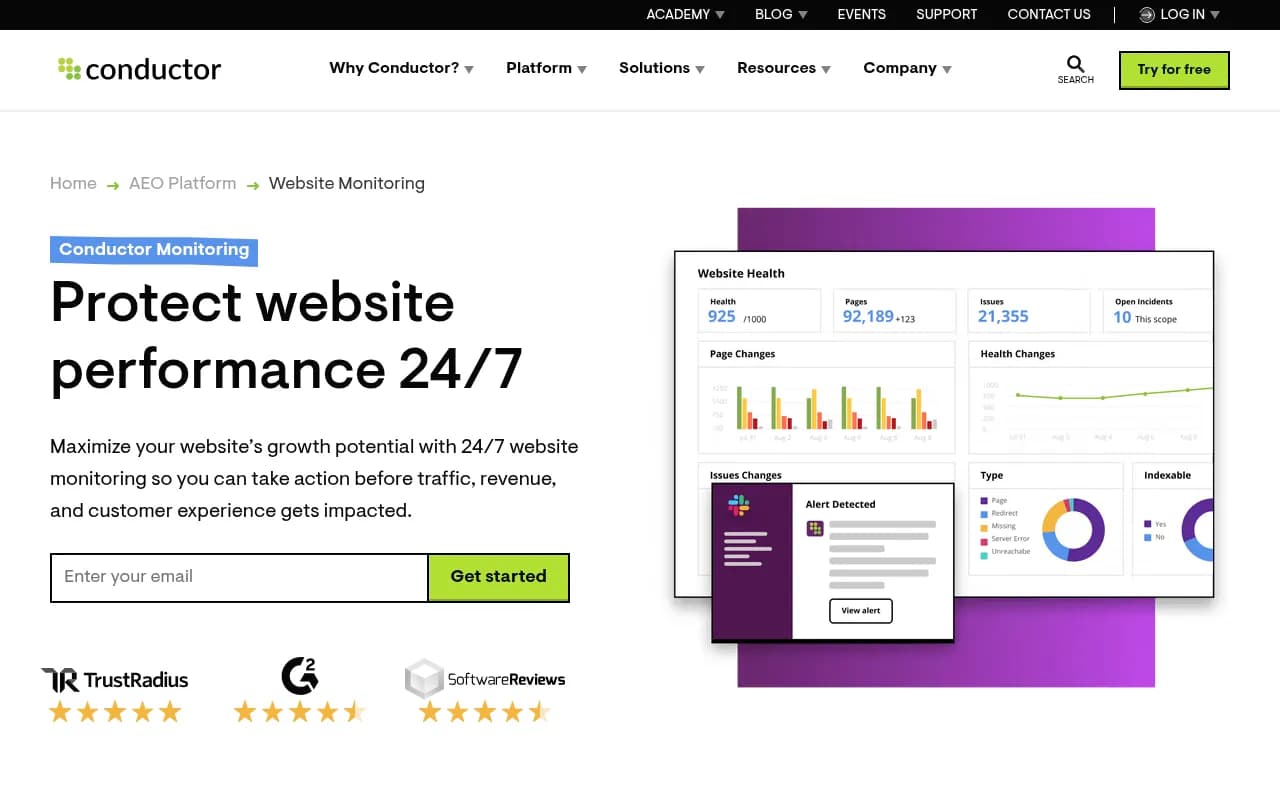
Conductor Website Monitoring (formerly ContentKing) is a 24/7 technical SEO monitoring platform that tracks every change on your website in real-time. Built for enterprise SEO teams and agencies managing large sites, it alerts you instantly when issues occur—broken links, missing metadata, indexing
Summary
- Best for: Enterprise SEO teams, large ecommerce sites, and agencies managing 50+ client websites who need instant alerts when technical issues occur
- Standout capability: Real-time monitoring that catches changes the moment they happen, not days later when a scheduled crawl runs
- Key limitation: Lacks AI search visibility tracking, content gap analysis, and optimization features that platforms like Promptwatch offer—Conductor focuses purely on technical monitoring, not AI SEO or content strategy
- Pricing: Starts at $139/month for basic monitoring; enterprise plans run $1,279/month and up
- Bottom line: Strong technical monitoring tool but monitoring-only—you'll need separate platforms for AI visibility tracking, content optimization, and strategic SEO planning

Conductor Website Monitoring (rebranded from ContentKing in 2024 after Conductor acquired the platform) is a technical SEO monitoring tool built around one core promise: catch website issues before they tank your traffic. It crawls your entire site continuously—not once a week like Screaming Frog or Sitebulb—and sends real-time alerts when something breaks. A developer accidentally noindexes your product pages at 3am? You get a Slack notification immediately, not five days later when your organic traffic has already dropped 40%.
The platform was originally founded in 2015 by a Dutch team frustrated with how long it took traditional crawlers to surface critical issues. Conductor (the enterprise SEO platform) acquired ContentKing in 2022 and fully integrated it into their suite in 2024, positioning it as the monitoring layer for large organizations running complex websites. The target audience is clear: enterprise SEO teams at ecommerce companies, SaaS platforms with thousands of pages, and agencies managing 20+ client sites who can't afford to miss a broken canonical tag or a rogue robots.txt update.
How the monitoring actually works
Conductor connects to your website via a JavaScript snippet (similar to Google Analytics) and monitors every page load in real-time. When a user or bot visits a page, Conductor checks the HTML, metadata, structured data, internal links, and dozens of other technical elements. If anything changes—a title tag gets rewritten, a canonical URL shifts, a 301 redirect breaks—the platform logs it instantly and compares it against your baseline configuration.
This is fundamentally different from scheduled crawlers. Screaming Frog runs once and gives you a snapshot. Conductor runs continuously and gives you a live feed of changes. The trade-off: you need meaningful traffic for it to work well. Low-traffic pages might not get checked often enough to catch issues quickly. For high-traffic enterprise sites, though, this approach is significantly faster than waiting for a weekly crawl.
The platform also runs its own scheduled crawls as a backup—so even if a page gets zero visitors, Conductor will eventually check it. But the real value is the real-time layer.
Core features and what they actually do
Real-time alerting: Set up custom alerts for specific issues (missing H1 tags, broken canonicals, pages returning 404s, changes to robots.txt) and get notified via email, Slack, or webhook the moment they occur. You can configure alerts by page segment—so your product pages trigger high-priority alerts, but your blog posts trigger low-priority ones. This is the feature that justifies the price tag for most users. One agency reported catching a site-wide noindex tag within 10 minutes of it going live, saving an estimated $1M in lost traffic.
Change tracking and audit logs: Every change to your website gets logged with a timestamp, before/after comparison, and the ability to drill into exactly what shifted. This is useful for large teams where multiple people deploy changes and no one remembers who updated the schema markup last Tuesday. The changelog is searchable and filterable, so you can isolate changes by page type, date range, or issue category. It's also helpful for diagnosing ranking drops—you can correlate a traffic decline with a specific technical change.
Intelligent prioritization: Conductor automatically scores issues based on business impact. A broken canonical on your homepage gets flagged as critical. A missing alt tag on a low-traffic blog post gets marked as low priority. You can customize the scoring rules to match your business—if product pages drive 80% of revenue, you can weight issues on those pages higher. This prevents alert fatigue. Without prioritization, you'd drown in notifications about minor issues on irrelevant pages.
Custom element monitoring: This is Conductor's version of content compliance tracking. You can monitor specific HTML elements, text snippets, or attributes across your site and get alerted when they appear or disappear. Use cases: tracking legal disclaimers on product pages, ensuring brand messaging stays consistent, verifying that tracking pixels are present, checking that specific CTAs appear on landing pages. It's essentially a site-wide ctrl+F that runs continuously. One retail client uses it to ensure sale banners appear correctly across 10,000+ product pages during promotions.
Page segmentation: Group pages by type (product pages, category pages, blog posts, landing pages) and analyze issues, performance, and changes at the segment level. This is critical for large sites—you don't want to manually filter through 50,000 pages to find the 200 product pages with missing schema markup. Segmentation also powers the prioritization engine and makes reporting cleaner.
Technical SEO audits: Conductor surfaces the standard set of technical issues—duplicate content, broken links, missing metadata, slow page speed, crawl errors, indexation problems, structured data errors, mobile usability issues. The audit interface is clean and well-organized, with issues grouped by category and severity. It's not dramatically different from what you'd get in Screaming Frog or Sitebulb, but the real-time updates and historical tracking add value.
Integrations: Google Search Console (pulls in indexation data and search performance metrics), Google Analytics (correlates traffic drops with technical changes), Slack (sends alerts), Zapier (connects to other tools), API access for custom workflows. The GSC integration is particularly useful—you can see which pages are indexed, which are blocked, and which have coverage errors, all within Conductor's interface.
Reporting and dashboards: Automated reports that can be scheduled and sent to stakeholders. The dashboards are customizable, so you can build views for different teams—executives get high-level traffic and issue summaries, developers get granular technical details. The reporting is solid but not groundbreaking. It does the job for client reporting or internal updates.
Who this tool is actually for
Conductor Website Monitoring is built for organizations where a technical SEO mistake can cost six or seven figures in lost revenue. That means:
- Enterprise ecommerce sites with 10,000+ product pages where a broken canonical or noindex tag can instantly kill organic traffic to high-value pages. One fashion retailer reported catching a site-wide indexation issue within minutes, preventing an estimated $500K in lost revenue.
- SaaS companies with large content libraries (500+ blog posts, documentation pages, landing pages) where maintaining technical health at scale is a full-time job. The real-time alerts let small SEO teams stay on top of issues without manually auditing the site every week.
- Digital agencies managing 20+ client sites who need a centralized monitoring dashboard and can't afford to miss critical issues. The ability to set up custom alerts per client and automate reporting saves hours of manual work.
- Large publishers and media companies where traffic drops directly impact ad revenue. Real-time monitoring means you catch issues before they compound.
Who should NOT use Conductor: Small businesses with under 500 pages, solo consultants managing a handful of low-traffic sites, or anyone on a tight budget. The pricing starts at $139/month and scales quickly—you're paying for enterprise-grade monitoring that only makes sense if the cost of downtime or technical errors is high. If you're running a 50-page local business site, a monthly Screaming Frog crawl is sufficient.
Also, Conductor is purely a technical monitoring tool. It does not help with keyword research, content strategy, backlink analysis, or AI search visibility. If you need those capabilities, you'll need separate platforms. For AI visibility and content optimization specifically, Promptwatch offers content gap analysis, AI crawler logs, and citation tracking that Conductor lacks entirely.
Integrations and ecosystem
Conductor integrates with Google Search Console (pulls indexation and performance data), Google Analytics (correlates traffic with technical changes), Slack (sends real-time alerts), and Zapier (connects to 3,000+ apps). API access is available on higher-tier plans, so you can build custom workflows or pull data into your own dashboards.
The platform also offers a Chrome extension for quick on-page audits, though it's not as feature-rich as the main web app. No mobile app—monitoring happens via the web interface or alerts pushed to Slack/email.
Pricing and value
Conductor Website Monitoring uses tiered pricing based on the number of pages monitored:
- Basic: $139/month for up to 10,000 pages, unlimited users, real-time monitoring, and basic alerting
- Standard: $319/month for up to 50,000 pages, everything in Basic plus advanced segmentation and custom alerts
- Pro: $449/month for up to 100,000 pages, everything in Standard plus API access and priority support
- Enterprise: $1,279/month and up for 100,000+ pages, dedicated account management, custom integrations, and SLA guarantees
All plans include unlimited users, which is a plus for agencies and large teams. No free trial is advertised on the website, but you can request a demo. Annual billing discounts are available.
How does this compare to competitors? Screaming Frog Desktop ($259/year) and Sitebulb ($45-$165/month) are cheaper but require manual crawls—you don't get real-time monitoring. Semrush Site Audit (part of Semrush plans starting at $139/month) offers scheduled crawls but not real-time tracking. Ahrefs Site Audit (part of Ahrefs plans starting at $129/month) is similar—scheduled crawls, no real-time layer. Conductor's pricing is justified if you need the real-time alerts and continuous monitoring. If you can live with weekly or monthly crawls, cheaper tools work fine.
For AI search visibility and content optimization, Promptwatch starts at $99/month and includes AI crawler logs, citation tracking, content gap analysis, and AI-generated content—capabilities Conductor doesn't offer at all.
Strengths
- Real-time monitoring is genuinely fast: Issues get flagged within minutes, not days. This is the core differentiator and it works as advertised.
- Intelligent prioritization reduces noise: Without it, you'd get overwhelmed by low-priority alerts. The scoring system is customizable and effective.
- Change tracking and audit logs are comprehensive: Every change is logged with before/after comparisons, making it easy to diagnose issues or track down who made a specific update.
- Custom element monitoring is underrated: Being able to track specific text snippets, HTML elements, or attributes across your entire site is powerful for compliance, brand consistency, and QA.
- Unlimited users on all plans: Agencies and large teams can onboard everyone without worrying about per-seat pricing.
Limitations
- No AI search visibility tracking: Conductor doesn't monitor how your brand appears in ChatGPT, Perplexity, Claude, Gemini, or other AI search engines. It also lacks AI crawler logs, citation tracking, and content gap analysis—all of which Promptwatch provides. If AI visibility matters to your SEO strategy, you'll need a separate platform.
- No content optimization or keyword research: Conductor is purely technical monitoring. It won't help you identify content gaps, optimize for target keywords, or plan your content strategy. You'll need Semrush, Ahrefs, or a dedicated content platform for that.
- Pricing scales quickly for large sites: If you're monitoring 500,000+ pages, you're looking at custom enterprise pricing that can run several thousand dollars per month. For smaller sites, the value proposition is weaker.
- Real-time monitoring requires traffic: Low-traffic pages might not get checked frequently enough to catch issues quickly. The scheduled crawls fill this gap, but it reduces the real-time advantage.
- No backlink analysis or competitive research: Conductor focuses on your own site's technical health. If you need backlink tracking, competitor analysis, or rank tracking, you'll need Ahrefs, Semrush, or Moz.
Bottom line
Conductor Website Monitoring is a strong technical SEO monitoring tool for enterprise teams and agencies who need real-time alerts and can't afford to miss critical issues. The real-time layer, intelligent prioritization, and comprehensive change tracking justify the price for large, high-traffic sites where a technical mistake can cost six figures in lost revenue.
But it's monitoring-only. If you need AI search visibility tracking, content gap analysis, or optimization tools, Promptwatch is the stronger choice—it monitors how your brand appears in 10+ AI models, surfaces content gaps, generates AI-optimized content, and tracks AI crawler activity. Conductor won't help you rank in ChatGPT or Perplexity.
Best use case in one sentence: Enterprise ecommerce sites and agencies managing 50+ large websites who need instant alerts when technical issues occur and can justify $300-$1,500/month for continuous monitoring.
Tags:
Frequently asked questions
What is ContentKing and what does it do?
How much does ContentKing cost?
Who is ContentKing best for?
Does ContentKing offer a free trial or free plan?
How is ContentKing different from Screaming Frog or other SEO crawlers?
What happened to ContentKing - is it still available?
What types of issues does ContentKing monitor?
Does ContentKing include content optimization or AI SEO features?
Similar and alternative tools to ContentKing