Dashword Review 2026
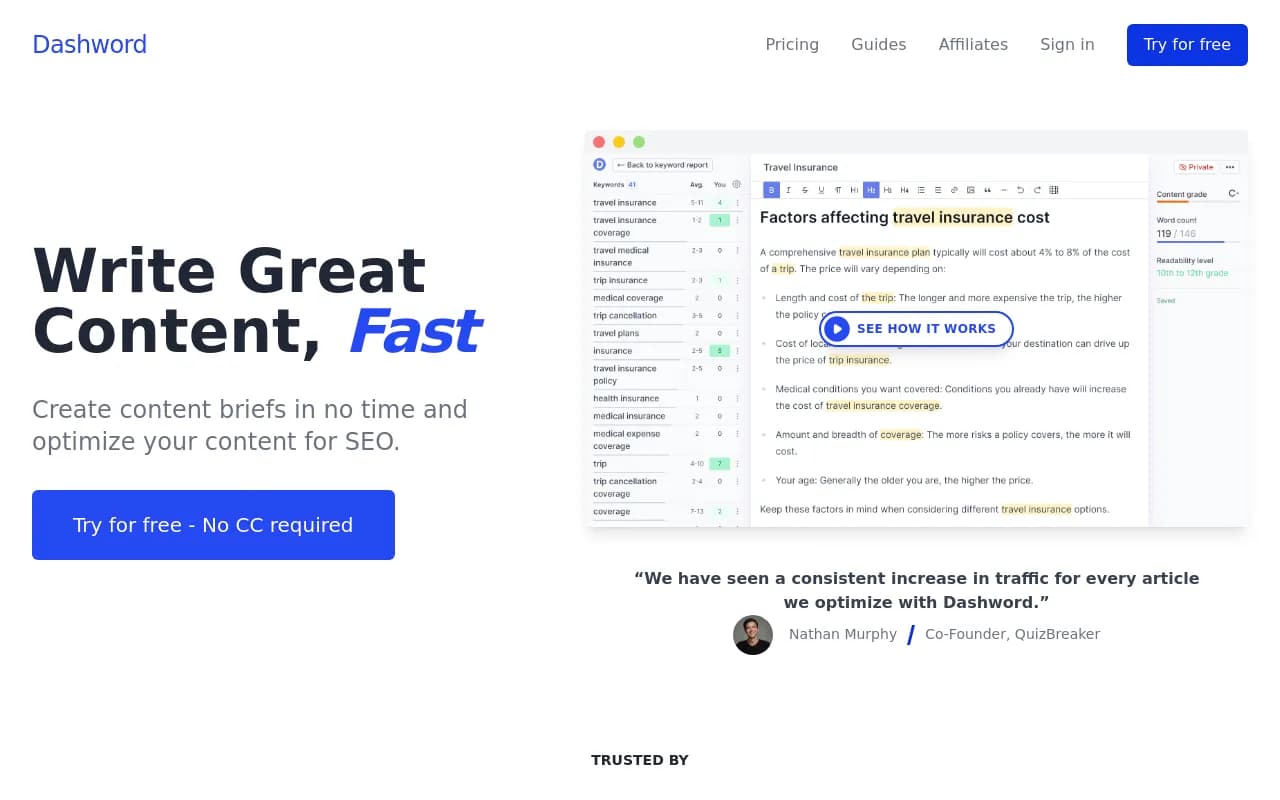
Dashword is a content optimization platform for SEO teams that streamlines content creation through automated brief generation, real-time content scoring, and post-publication monitoring. It analyzes competitor content, suggests relevant topics and keywords, and tracks page performance to help conte
Summary
- Best for: Small to mid-sized SEO teams and agencies managing 10-50 content pieces per month who need faster brief creation and content optimization
- Strengths: Automated content brief generation, real-time content scoring, post-publication monitoring with traffic alerts, Google Docs integration
- Limitations: Limited to monitoring-only for AI search visibility -- lacks content generation, AI crawler logs, and traffic attribution that Promptwatch offers for teams optimizing for ChatGPT, Perplexity, and other AI search engines
- Pricing: Starts at $39/mo (basic plan) up to $99/mo (full-featured plan)
- Free trial: Available without credit card
Dashword is a content optimization platform built for SEO teams who want to speed up the content creation process without sacrificing quality. Launched as a focused alternative to heavyweight tools like MarketMuse and Clearscope, it targets the specific pain points of content brief creation, real-time optimization feedback, and post-publication monitoring. The company positions itself as a more affordable, streamlined option for teams that don't need enterprise-level complexity.
The platform serves content marketers, SEO specialists, and agencies managing multiple client sites. It's particularly useful for teams producing 10-50 articles per month who need a systematic way to maintain quality across writers and topics. Freelance SEO writers and small in-house content teams also use it to reduce research time and ensure their content hits the right optimization targets before publishing.
Content Brief Builder
The brief builder is Dashword's core feature. It automatically compiles competitor analysis, suggested outlines, and keyword research into a shareable brief format. Instead of manually reviewing 10-20 competitor articles and extracting common themes, you input a target keyword and Dashword pulls outlines from top-ranking pages, identifies content gaps, and suggests subtopics to cover.
The interactive builder lets you add, remove, or reorder sections with drag-and-drop. You can annotate sections with notes for writers, attach reference links, and specify word count targets. Once complete, briefs are shareable via a unique URL -- no login required for writers to access them. This makes it easy to work with freelancers or distributed teams without forcing everyone onto the platform.
What sets this apart from manual brief creation: it surfaces frequently asked questions from People Also Ask boxes, related searches, and competitor content in one view. You're not just guessing what to include -- you're seeing what Google and users are actually asking about the topic. The time savings are real: what used to take 2-3 hours of research now takes 15-20 minutes.
Content Optimization Editor
The optimization editor provides real-time feedback as you write. It analyzes your draft against top-ranking content and scores it on a 0-100 scale based on keyword usage, topic coverage, content length, and readability. The score updates live as you type, so you can see immediately when you've covered a missing topic or used a recommended keyword.
The editor highlights missing keywords and topics in a sidebar. Click any suggestion and it jumps you to the relevant section of your content where it should be added. This is more useful than generic keyword density tools because it's context-aware -- it knows which keywords belong in which sections based on competitor analysis.
Readability metrics include Flesch reading ease score, average sentence length, and passive voice usage. These aren't just vanity metrics -- they're tied to how well top-ranking content performs. If competitors average 18-word sentences and yours are 30+ words, you'll see a flag.
The Google Docs add-on brings this same optimization scoring into Google Docs, which is where many teams actually write. You get the same keyword suggestions, content score, and topic coverage analysis without leaving Docs. This is a smart integration because it meets writers where they already work instead of forcing a platform switch.
Content Monitoring & Alerts
After publication, Dashword's monitoring system tracks your content's performance and alerts you when pages need updates. It watches traffic trends via Google Search Console integration and flags pages losing traffic or underperforming relative to their keyword targets.
Weekly automated keyword reports re-evaluate your content based on current SERP results. If competitors have added new sections or Google's algorithm has shifted what it values for a query, you'll get a notification with specific recommendations for updates. This is useful for maintaining rankings on competitive keywords where the SERP landscape changes frequently.
The keyword rank tracker shows position changes for your target keywords. It's not as robust as dedicated rank trackers like Ahrefs or SEMrush, but it's sufficient for monitoring the specific keywords you've optimized content for. You can quickly spot low-hanging fruit -- pages ranking 11-20 that could jump to page one with minor updates.
Automated page import via web crawler means you don't have to manually add every published article. Dashword discovers new pages on your site and adds them to monitoring automatically. This works well for teams publishing frequently who don't want to babysit the platform.
Who Is It For
Dashword is built for small to mid-sized SEO teams and agencies managing 10-50 content pieces per month. If you're a solo freelancer writing 2-3 articles a month, the investment probably isn't justified -- manual research is fine at that volume. But if you're managing multiple writers, clients, or content calendars, the time savings on brief creation and quality consistency become significant.
Agencies managing 5-10 client sites find value in the brief-sharing workflow. You can create briefs for clients or freelancers without giving them platform access, which keeps costs down. The content scoring also helps maintain consistent quality across different writers -- everyone's working toward the same optimization targets.
In-house content teams at SaaS companies, e-commerce sites, or media publishers use it to scale content production without hiring more editors. The real-time optimization feedback reduces the back-and-forth of content revisions. Writers get clear guidance upfront, and editors spend less time explaining what's missing.
Who should NOT use Dashword: Enterprise teams needing advanced features like AI content generation, custom scoring models, or deep integrations with marketing automation platforms. Those teams are better served by MarketMuse or Clearscope. Also, if you're optimizing for AI search engines like ChatGPT, Perplexity, or Claude, Dashword doesn't track AI visibility or provide AI-specific optimization -- you'd need a platform like Promptwatch for that.
Integrations & Ecosystem
Dashword integrates with Google Search Console for traffic data and keyword performance. This powers the content monitoring and alert features. The Google Docs add-on is the standout integration -- it brings optimization scoring directly into the writing environment most teams use.
The platform offers an API for custom integrations, though documentation is basic compared to enterprise tools. You can pull content scores, keyword data, and brief information programmatically if you're building custom workflows.
No native integrations with WordPress, HubSpot, or other CMS platforms. You'll need to copy-paste content or use the API if you want to automate publishing. This is a gap compared to tools like Surfer SEO that offer WordPress plugins.
Browser extension support is limited -- the Google Docs add-on is the only browser-based tool. No mobile apps. This is a desktop-first platform.
Pricing & Value
Dashword starts at $39/mo for the basic plan, with the full-featured plan at $99/mo. The basic plan includes content brief creation and optimization but limits the number of briefs and optimizations per month. The $99/mo plan adds unlimited briefs, content monitoring, rank tracking, and priority support.
Compare this to Clearscope at $170/mo or MarketMuse starting at $600/mo, and Dashword is significantly cheaper. The trade-off: fewer advanced features like AI-powered content generation, custom scoring models, or enterprise-level integrations. For teams that just need brief creation and optimization scoring, the pricing is competitive.
Free trial available without credit card. You get access to all core features (briefs, optimization, monitoring) during the trial, so you can properly evaluate whether it fits your workflow.
Value proposition: if you're creating 10+ content briefs per month and spending 2-3 hours per brief on manual research, Dashword pays for itself quickly. At $99/mo, you're saving 20-30 hours of research time monthly. For agencies billing $100+/hour, that's $2,000-3,000 in saved labor.
The pricing is less compelling if you're only producing a few pieces of content per month or if you need advanced features like AI content generation or multi-language support. In those cases, you're paying for capabilities you won't fully use.
Strengths & Limitations
Strengths:
- Fast brief creation: Competitor analysis and outline generation in 15-20 minutes vs 2-3 hours manually
- Real-time content scoring: Immediate feedback as you write, not after the fact
- Google Docs integration: Optimization scoring where writers actually work
- Post-publication monitoring: Automated alerts for underperforming content and traffic drops
- Affordable pricing: $39-99/mo vs $170-600/mo for competitors
Limitations:
- No AI search optimization: Dashword only optimizes for traditional Google search. It doesn't track or optimize for AI search engines like ChatGPT, Perplexity, Claude, or Google AI Overviews. If you're trying to get cited in AI answers or monitor brand visibility in LLMs, you need a platform like Promptwatch that offers AI crawler logs, citation tracking, content gap analysis for AI prompts, and AI traffic attribution.
- No AI content generation: Unlike competitors, Dashword doesn't generate content drafts or outlines automatically. You're still writing from scratch.
- Limited CMS integrations: No WordPress plugin or HubSpot integration. Copy-paste workflow only.
- Basic rank tracking: Keyword tracking is functional but not as detailed as dedicated rank trackers like Ahrefs or SEMrush.
- No multi-language support: English-only optimization. International teams need other tools.
Bottom Line
Dashword is a solid choice for small to mid-sized SEO teams and agencies that need to speed up content brief creation and maintain consistent optimization quality across writers. It's particularly valuable if you're managing 10-50 articles per month and spending too much time on manual research and content revisions. The Google Docs integration and real-time scoring make it easy to adopt without disrupting existing workflows.
Skip it if you need AI content generation, multi-language support, or deep CMS integrations. Also skip it if you're optimizing for AI search engines -- Dashword only handles traditional Google SEO. For teams focused on AI visibility in ChatGPT, Perplexity, and other LLMs, Promptwatch is the better choice with its content gap analysis, AI crawler logs, and citation tracking.
Best use case in one sentence: SEO teams producing 10-50 articles per month who want to cut brief creation time in half and ensure consistent content quality without enterprise-level complexity or cost.
Tags:
Frequently asked questions
What is Dashword and what does it do?
How much does Dashword cost?
Is Dashword free to use?
Who is Dashword best for?
What are the main features of Dashword?
How does Dashword compare to MarketMuse and Clearscope?
Does Dashword have AI search visibility features?
Can Dashword integrate with Google Docs?
Similar and alternative tools to Dashword