NovelPad Review 2026
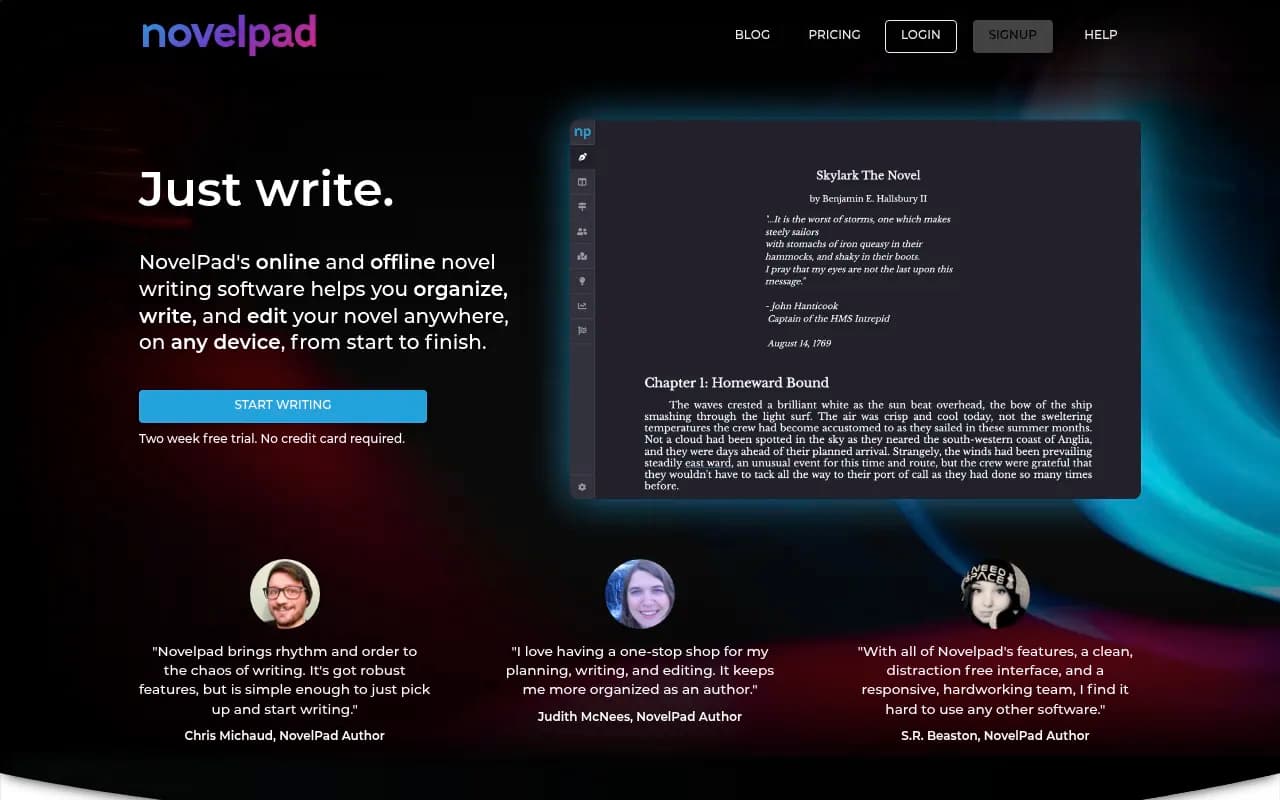
Distraction-free writing environment built specifically for novel writing with organizational tools for chapters, characters, and plot development.
Summary
- Best for: Fiction authors writing novels who want cloud-based organization and don't need desktop-only power features
- Standout feature: Rewind lets you restore any previous save from your entire writing history -- automatic version control without thinking about it
- Main limitation: Web-first design means no true offline mode on desktop (offline works on mobile apps only), and fewer advanced features than Scrivener
- Pricing: $15/month or $120/year (33% discount) after a 14-day free trial
- Bottom line: A modern, accessible alternative to Scrivener for novelists who prioritize cloud sync and simplicity over desktop power
NovelPad is a cloud-based novel writing application built specifically for fiction authors who need organizational structure without the complexity of traditional desktop writing software. Launched as a web-first platform, it targets novelists who write across multiple devices and want automatic syncing, version control, and collaborative editing without managing local files. The tool positions itself as a simpler, more accessible alternative to Scrivener -- trading some advanced features for a cleaner interface and seamless cloud integration.
The platform is built around the idea that novelists need more than a word processor but less than a full project management system. It's designed for authors writing long-form fiction (novels, series, screenplays) who want to organize chapters, track characters, and visualize story structure without learning a steep interface. The team maintains an active Discord community where users can chat with staff and other writers, which is unusual for writing software and signals a focus on building a writer community rather than just selling software.
Manuscript Editor & Scene Management
The core editor is intentionally minimal -- a distraction-free writing space with basic formatting (bold, italic, headings) and no visual clutter. You write in scenes rather than one continuous document, which mirrors how most novelists actually structure their work. Each scene is a separate unit you can move, tag, and track independently.
Scene cards are the organizational backbone. You can drag and drop scenes to reorder chapters, move scenes between columns (representing acts, plot threads, or timelines), and view your entire manuscript structure at a glance. This is similar to Scrivener's corkboard view but implemented as a web interface with smoother drag-and-drop. You can color-code scenes, add tags, and filter by attributes like POV character or location.
Scene columns let you organize scenes into custom groups beyond just chapters. You might have columns for "Act 1", "Act 2", "Act 3" or "Main Plot", "Subplot A", "Subplot B". This is useful for authors who outline or want to visualize parallel storylines. You can collapse columns, reorder them, and move scenes between them without affecting the actual chapter structure.
Character Tracking & Insights
Character tracking automatically highlights every scene where a specific character appears. You can click a character's name and see a filtered view of your manuscript showing only their scenes -- essentially reading the novel from that character's perspective. This is powerful for checking character arcs, ensuring consistent voice, or spotting gaps where a character disappears for too long.
The Insights Board cross-references scene attributes to surface patterns in your manuscript. You can see which characters appear together most often, which locations are underused, or how POV distribution breaks down across your novel. It's not as deep as dedicated story analysis tools, but it's more than most writing apps offer. The insights are visual (charts and graphs) rather than just lists, which makes patterns easier to spot.
Rewind & Version Control
Rewind is NovelPad's standout feature. The app auto-saves to the cloud every minute, and you can restore any previous save from your entire writing history. Not just daily snapshots -- every single save. If you delete a scene on Tuesday and realize on Friday you need it back, you can rewind to Tuesday's version and restore it. This removes the anxiety of "did I save the right version" that plagues writers using local files.
The rewind interface shows a timeline of all your saves with word count changes, so you can see when you made significant edits. You can preview any save before restoring it, and restoring doesn't overwrite your current version -- it creates a new branch you can merge or discard. This is version control designed for writers who don't want to think about version control.
Goals & Progress Tracking
Adaptive goals adjust based on your writing schedule and deadline. You set a target word count and finish date, and NovelPad calculates daily goals that account for days you've already missed or exceeded. If you write 2,000 words on Monday, your Tuesday goal adjusts down. If you skip Wednesday, Thursday's goal adjusts up. This is more forgiving than fixed daily goals and helps you stay on track without feeling punished for inconsistent writing days.
Word count and time tracking happen automatically for every scene. You can see how long you spent writing each scene, your average words per hour, and total time invested in the manuscript. The visual timeline shows your progress over weeks and months, with color-coded bars indicating productive days. It's motivating without being gamified.
Collaboration & Sharing
Real-time collaboration lets you share your manuscript with an editor or co-author who can comment, suggest edits, and chat with you inside the document. Changes sync instantly, and you can see who's viewing the manuscript at any moment. This is useful for working with editors or beta readers who want to leave inline feedback rather than emailing marked-up Word docs.
The Discord community is active and moderated by NovelPad staff. You can ask questions, share progress, participate in writing sprints, and get help troubleshooting. The team is responsive -- they often reply to questions within hours. This community aspect is rare for writing software and makes NovelPad feel less like a tool and more like a platform.
ProWritingAid Integration
NovelPad integrates ProWritingAid for grammar, spelling, and style checking. You can run reports on individual scenes or your entire manuscript without leaving the app. This includes readability scores, overused words, sentence length variation, and passive voice detection. The integration is seamless -- you don't need a separate ProWritingAid subscription if you're a NovelPad user, though the exact terms of what's included aren't clear from the website.
Import & Export
You can import existing manuscripts from Word (.docx) to get started quickly. NovelPad attempts to parse chapters and scenes automatically, though you may need to adjust the structure after import. Export options include Word, plain text, and PDF. There's no native ePub export, which is a limitation if you're self-publishing and want to generate ebook files directly.
Offline Mode & Device Support
NovelPad works on desktop (web browser), laptop (web browser), phone (iOS/Android apps), and tablet (iOS/Android apps). The mobile apps support offline writing -- you can write without internet and changes sync when you reconnect. However, the desktop version is web-only, meaning you need an internet connection to write on your computer. This is a significant limitation compared to Scrivener or Ulysses, which are fully functional offline.
The mobile apps are simplified versions of the web interface. You can write, edit, and view scene cards, but some features (like Insights Board and detailed progress tracking) are desktop-only. The mobile experience is designed for quick writing sessions, not full manuscript management.
Who Is It For
NovelPad is built for fiction authors writing novels, series, or screenplays who want cloud-based organization and don't need desktop-only power features. It's ideal for:
- Novelists who write across multiple devices: If you draft on your laptop at home, edit on your tablet during commutes, and jot notes on your phone, NovelPad's cloud sync is seamless. You never think about which device has the latest version.
- Authors who outline or plot visually: The scene cards and columns are perfect for plotters who want to see story structure at a glance. Pantsers can use it too, but the organizational tools shine for authors who plan.
- Writers collaborating with editors: Real-time collaboration and inline commenting make it easy to work with an editor without emailing files back and forth.
- Authors intimidated by Scrivener: If you've tried Scrivener and found it overwhelming, NovelPad offers similar organizational power with a gentler learning curve.
Who should NOT use NovelPad:
- Desktop-only writers who need offline access: The web-based desktop version requires internet. If you write in coffee shops with spotty Wi-Fi or prefer local files, this is a dealbreaker.
- Non-fiction authors or academics: NovelPad is designed for fiction. It lacks research organization, citation management, and the kind of reference material handling that Scrivener excels at.
- Authors who need advanced formatting: If you're writing illustrated books, technical manuals, or anything requiring complex layouts, NovelPad's minimal editor won't cut it.
- Writers on a tight budget: At $120/year, it's more expensive than a one-time Scrivener purchase ($49) and costs more annually than Ulysses ($50/year). If you're writing casually or infrequently, the subscription adds up.
Integrations & Ecosystem
NovelPad integrates ProWritingAid for grammar and style checking, which is its main third-party integration. There's no API, no Zapier support, and no integrations with tools like Airtable, Notion, or Google Docs. The platform is self-contained by design -- you work inside NovelPad rather than connecting it to other tools.
The Discord community is the closest thing to an ecosystem. It's where users share tips, troubleshoot issues, and participate in writing events. The team uses Discord for support rather than email tickets, which is faster but also means you need to join Discord to get help.
Pricing & Value
NovelPad costs $15/month or $120/year (33% discount for annual billing). There's a 14-day free trial with no credit card required. The pricing is straightforward -- one plan, all features included, no usage limits or tiered pricing.
Compared to competitors:
- Scrivener: $49 one-time purchase (Mac/Windows), $24 (iOS). NovelPad costs more over time but offers cloud sync and version control that Scrivener lacks.
- Ulysses: $50/year or $6/month. Similar pricing to NovelPad but focused on Markdown and lacks novel-specific features like scene cards and character tracking.
- Atticus: $147 one-time purchase. More expensive upfront but includes formatting and self-publishing tools NovelPad doesn't have.
- Dabble Writer: $10/month or $100/year. Cheaper than NovelPad with similar features, but less polished interface and smaller community.
NovelPad's value depends on how much you use the cloud sync and version control. If you write on multiple devices and want automatic backups, the subscription is worth it. If you write on one computer and don't need cloud features, Scrivener's one-time purchase is better value.
Strengths
- Rewind feature is genuinely unique: Automatic version control that lets you restore any previous save is peace of mind most writing apps don't offer. You never lose work.
- Scene cards and columns are intuitive: Drag-and-drop organization is easier to learn than Scrivener's binder and feels more visual. You can restructure your novel in seconds.
- Cloud sync actually works: Writing on your laptop, continuing on your phone, and finishing on your tablet is seamless. No manual syncing or file conflicts.
- Active community and responsive support: The Discord server is genuinely helpful, and the team replies quickly. This matters when you're stuck or need a feature explained.
- Character tracking is clever: Filtering scenes by character is a simple feature that solves a real problem -- checking character arcs without manually searching.
Limitations
- No true offline mode on desktop: The web-based desktop version requires internet. If you write in places without reliable Wi-Fi, this is a major limitation. Mobile apps work offline, but the desktop experience is where most serious writing happens.
- Fewer advanced features than Scrivener: No research folder, no split-screen editing, no scriptwriting mode, no corkboard annotations. NovelPad is simpler by design, but power users will miss these.
- Subscription cost adds up: At $120/year, you'll spend more than Scrivener's one-time $49 in two years. If you're writing one novel and don't need ongoing cloud sync, the subscription feels expensive.
- Limited export options: No native ePub export means you'll need additional tools for self-publishing. Scrivener and Atticus handle this better.
- Web-first design has performance quirks: Large manuscripts (100k+ words) can feel sluggish in the browser compared to native desktop apps. This improves over time as the team optimizes, but it's noticeable.
Bottom Line
NovelPad is best for fiction authors who write across multiple devices and want cloud-based organization without Scrivener's complexity. The rewind feature, scene cards, and character tracking are genuinely useful for novelists, and the active community makes it feel less like software and more like a writing platform. However, the lack of true offline mode on desktop, limited export options, and subscription pricing make it less appealing for writers who prefer local files or write infrequently. If you're a novelist who values automatic backups, seamless device switching, and a clean interface over advanced power features, NovelPad is worth the $120/year. If you write on one computer and don't need cloud sync, Scrivener's one-time purchase is better value.
Frequently asked questions
What is NovelPad?
How much does NovelPad cost?
Is NovelPad free to use?
Does NovelPad work offline?
What is NovelPad best for?
How does NovelPad compare to Scrivener?
What is the Rewind feature in NovelPad?
Can I use NovelPad on multiple devices?
What are the main limitations of NovelPad?
Who should use NovelPad?
Similar and alternative tools to NovelPad