Reedsy Studio Review 2026
Comprehensive writing tool with plotting, collaboration, and formatting features. Designed for authors to craft manuscripts from outline to publication-ready format.
Summary: Key Takeaways
- Free core platform with professional formatting and export tools -- rare in the writing software space where most competitors charge $50-200/year for similar features
- Outlining Boards are exceptionally flexible -- infinitely customizable for characters, research, world-building, or any planning structure you need
- Real-time collaboration with track changes built in -- no more emailing Word docs back and forth with your editor
- One-click EPUB and print-ready PDF export using professionally designed templates -- eliminates the need for separate formatting software like Vellum ($250) or Atticus ($147)
- Limited mobile experience -- browser-only, no native app, which makes on-the-go writing less convenient than Scrivener or Ulysses
- Premium features are cheap but basic -- $4.99/month for writing stats and dark mode feels like table stakes that should be free
Reedsy Studio is a free, browser-based writing platform built specifically for authors working on long-form manuscripts. Launched by Reedsy (the freelance marketplace connecting authors with editors, designers, and marketers), Studio aims to be an all-in-one solution for the entire book creation process -- from initial brainstorming through to publication-ready files. The target audience is primarily fiction authors and self-publishers who want a streamlined workflow without juggling multiple apps or paying for expensive desktop software.
What sets Studio apart from tools like Scrivener, Atticus, or Google Docs is its focus on the complete author journey in a single, accessible platform. You're not just writing -- you're planning with flexible boards, collaborating with editors in real time, tracking your daily progress, and exporting professional ebooks and print files. And the core features are completely free, which is almost unheard of in this space.
The Writing Experience
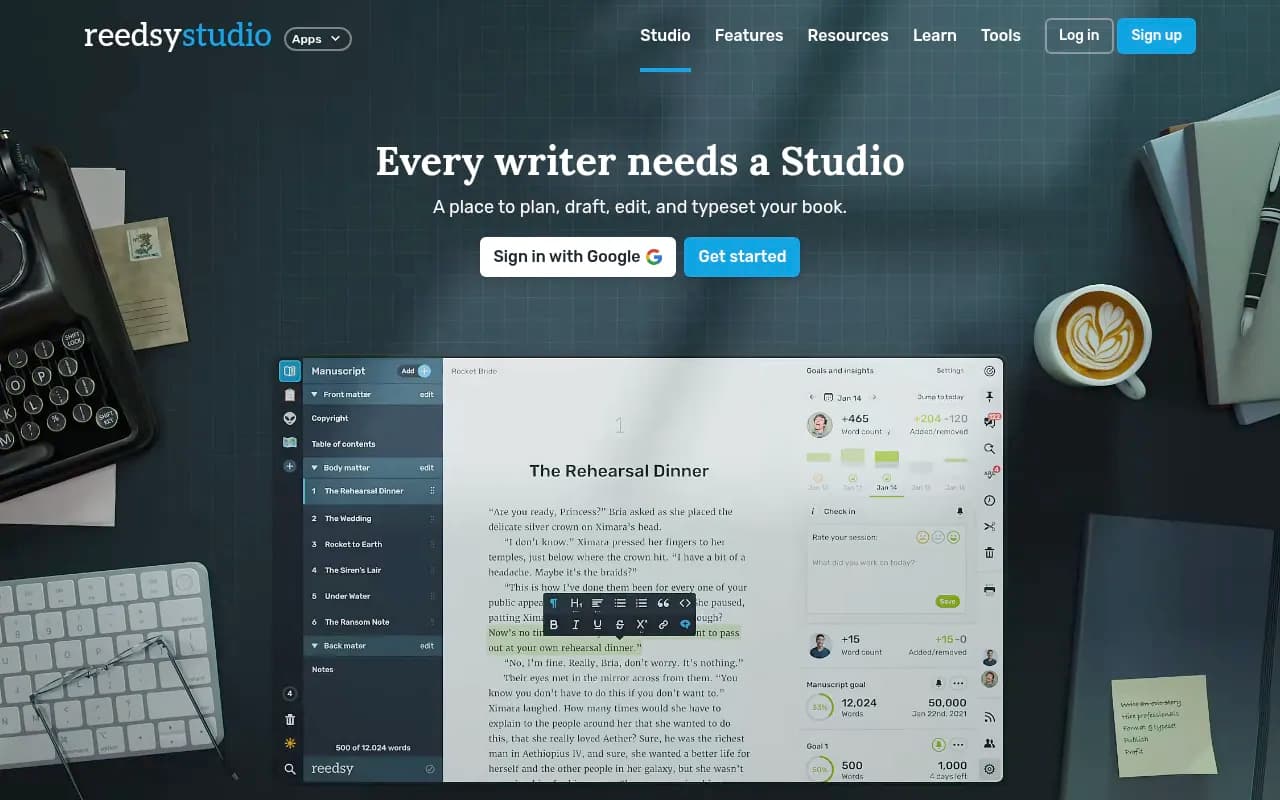
The editor itself is clean and distraction-free. You get a chapter sidebar on the left, your manuscript in the center, and simple formatting controls (bold, italic, headings, block quotes). It feels instantly familiar if you've used any modern writing app -- no learning curve, no clutter. The interface is deliberately minimal because the goal is to keep you writing, not fiddling with settings.
Chapter organization is straightforward. Create new chapters, drag to reorder, nest chapters into parts or sections. Each chapter lives as a separate document, which makes it easy to jump around your manuscript without scrolling through a 90,000-word wall of text.
Writing goals and progress tracking are built in. Set a daily word count target, and Studio tracks your streak. You get a simple dashboard showing words written per day, total word count, and how close you are to your goal. It's motivational without being gamified or annoying. The stats are basic -- nothing like the deep analytics in Novlr or Dabble -- but they're enough to keep you accountable.
Import and export is painless. Bring in your existing manuscript from DOCX, TXT, or other common formats. Studio parses it into chapters automatically (though you may need to clean up the structure). Exporting is just as easy -- download as DOCX, EPUB, or print-ready PDF with one click.
Dark mode is available, but only on the premium plan (Studio Essential, $4.99/month). This feels like a miss -- dark mode is a standard feature in almost every writing app, and charging for it seems petty.
Outlining with Boards
Boards are where Reedsy Studio really shines. Think of them as infinitely flexible notecards or index cards that you can organize however you want. You can create a Board for anything: character profiles, plot outlines, research notes, world-building details, magic systems, locations, timelines.
Each Board is a collection of cards. Each card can contain text, images, links, or nested sub-cards. You can drag cards around, group them, color-code them, link them to specific chapters in your manuscript. It's like a digital corkboard that adapts to your planning style instead of forcing you into a rigid template.
Use cases for Boards:
- Character sheets: Create a card for each character with backstory, motivations, physical descriptions, relationships. Link the card to chapters where that character appears.
- Plot outlining: One card per scene or chapter. Drag to reorder as your structure evolves. Nest cards under acts or plot threads.
- Research repository: Drop in links, images, quotes, historical facts. Keep everything in one place instead of scattered across browser tabs and notebooks.
- World-building: Map out your fantasy world's geography, political factions, magic rules, or sci-fi tech systems.
The flexibility is the point. Studio doesn't assume you outline the same way as everyone else. Pantsers can use Boards for loose notes. Plotters can build detailed beat sheets. The system adapts.
Boards are part of the Outlining premium plan ($7.99/month). The free version gives you basic note-taking, but you don't get the full Board functionality. This is one of the few features where the paywall makes sense -- advanced planning tools are a premium feature in most writing apps.
Collaboration and Editing
Studio supports real-time collaboration with track changes and comments. Invite your co-author, editor, or beta reader to your project. They can make edits, leave comments, and suggest changes. You see everything live -- no more emailing Word docs back and forth, no version control nightmares.
Track changes work like Google Docs or Word. Edits show up as suggestions that you can accept or reject. Comments thread on specific paragraphs. You can reply to comments, resolve them, or leave them open. It's clean and functional.
Permissions are simple: you can give someone view-only access, comment access, or full editing access. There's no granular control (e.g. "can edit chapters 1-5 but not 6-10"), but for most author-editor workflows, the basic permissions are enough.
Integration with Reedsy Marketplace: If you hire an editor through Reedsy's freelance marketplace, they can work directly in Studio. This is a nice touch -- you're already paying Reedsy a 20% commission on the collaboration, so having the editor work in your Studio project keeps everything in one place. No need to export, send files, re-import edits.
Beta reader previews are another collaboration feature. Generate a shareable link to your manuscript (or specific chapters) that opens in a clean, distraction-free e-reader. Your beta readers don't need a Reedsy account -- they just click the link and read. You can disable the link anytime. It's a simple way to get feedback without sending PDFs or giving full editing access.
Formatting and Export
This is where Studio really delivers value, especially for self-publishers. Most authors either pay for expensive software like Vellum ($250 for Mac-only) or Atticus ($147 one-time), or they hire a formatter ($200-500 per book). Studio does it for free.
EPUB export: Choose a template (there are several professionally designed options), customize fonts and spacing, and export. The EPUB files are clean, valid, and compatible with Amazon KDP, Apple Books, Kobo, Google Play, and other distributors. You can preview the EPUB in Studio's built-in e-reader before exporting to make sure it looks right.
Print-ready PDF export: Select your trim size (5x8, 6x9, etc.), choose a template, customize headers/footers, and export a PDF ready for print-on-demand services like Amazon KDP Print, IngramSpark, or Lulu. The templates handle all the fiddly details -- margins, gutters, page numbering, chapter breaks.
Templates are the key. Studio includes a handful of genre-appropriate designs (literary fiction, thriller, romance, non-fiction). Each template has sensible defaults for typography, spacing, and layout. You can tweak settings (font size, line spacing, chapter heading style), but you don't have to. The defaults are good enough for most books.
The formatting isn't as customizable as Vellum or Atticus -- you can't design your own chapter ornaments or build complex layouts -- but for 95% of fiction and non-fiction books, Studio's templates are perfectly adequate. And they're free.
Versioning and Backups
Studio automatically saves your work as you type. There's a version history feature (premium only) that lets you roll back to previous versions of your manuscript. This is useful if you delete a scene and later decide you want it back, or if you want to compare different drafts.
Backups are automatic. Your manuscript lives in the cloud, so you don't have to worry about losing work if your laptop dies. You can also export your manuscript as a DOCX file anytime to keep a local backup.
Who Is Reedsy Studio For?
Best fit:
- Self-publishing fiction authors who want a free, all-in-one platform for writing, editing, and formatting. If you're publishing on Amazon KDP or other platforms and don't want to pay for Vellum or hire a formatter, Studio is a no-brainer.
- Authors who collaborate with editors or co-authors. The real-time editing and track changes make it easy to work with others without the friction of file-sharing.
- Plotters who love flexible outlining. If you want to map out characters, plot threads, and world-building details in a visual, customizable way, Boards are excellent.
- Writers on a budget. The free tier is genuinely useful -- you can write, format, and publish a book without paying a cent. The premium plans ($4.99-7.99/month) are cheap compared to Scrivener ($60), Atticus ($147), or Vellum ($250).
Not ideal for:
- Mobile-first writers. Studio is browser-only with no native mobile app. The mobile web experience is functional but clunky. If you write primarily on your phone or tablet, Ulysses (iOS/Mac) or Novlr (which has a better mobile web interface) are better choices.
- Authors who need advanced formatting control. If you're publishing a cookbook, a poetry collection, or a heavily illustrated book, Studio's templates won't cut it. You'll need Vellum, Atticus, or a professional formatter.
- Writers who want offline access. Studio is cloud-only. No internet, no writing. Scrivener and other desktop apps let you work offline and sync later.
- Non-fiction authors with complex structures. Studio is optimized for linear narratives (novels, memoirs). If you're writing a textbook or reference book with sidebars, footnotes, and non-linear navigation, you'll hit limitations.
Integrations and Ecosystem
Studio is part of the broader Reedsy ecosystem, which includes:
- Reedsy Marketplace: Hire editors, cover designers, formatters, and marketers. If you hire through Reedsy, they can work directly in your Studio project (for editors) or access your files easily.
- Reedsy Learning: Free courses on writing, editing, and publishing. Not integrated with Studio, but it's a nice resource if you're learning the craft.
- Reedsy Discovery: A platform for readers to discover indie books. You can list your book here after publishing.
There are no third-party integrations. Studio doesn't connect to Grammarly, ProWritingAid, Scrivener, or other writing tools. It's a closed ecosystem. You can export to DOCX and run it through external tools, but there's no direct integration.
No API for developers or power users. Studio is designed for authors, not for building custom workflows.
Pricing and Value
Free tier: Includes the core writing editor, basic outlining/notes, collaboration with track changes, and EPUB/PDF export. This is 90% of what most authors need. The free tier alone makes Studio competitive with paid tools.
Studio Essential ($4.99/month or $49.99/year): Adds writing stats, dark mode, and version history. Honestly, these feel like features that should be free. Writing stats and dark mode are standard in almost every writing app. Version history is useful but not essential for most authors.
Outlining ($7.99/month or $79.99/year): Unlocks the full Boards feature for advanced planning and world-building. This is the premium tier that makes sense -- Boards are a genuinely powerful feature that goes beyond basic note-taking.
You can subscribe to both plans ($12.98/month total) if you want everything. There's a 30-day free trial with no credit card required.
Value comparison:
- Scrivener: $60 one-time (Mac/Windows/iOS). More powerful for complex projects, works offline, but steeper learning curve and no built-in formatting for ebooks.
- Atticus: $147 one-time. Better formatting control, works offline, but no collaboration features and no free tier.
- Vellum: $250 one-time (Mac only). Best-in-class formatting, but expensive and Mac-only. No writing or planning features.
- Novlr: $10/month. Similar feature set to Studio, better mobile experience, but no free tier.
- Google Docs: Free. Good for collaboration, terrible for formatting books.
Studio's free tier beats Google Docs for book formatting. Studio's premium tiers are cheaper than Novlr and Atticus. The main trade-off is offline access and mobile experience -- Scrivener and Atticus win there.
Strengths and Limitations
Strengths:
- Free core features that actually work. You can write, format, and publish a book without paying anything. This is rare.
- EPUB and PDF export are professional quality. The templates are clean and genre-appropriate. You don't need Vellum or a formatter.
- Boards are exceptionally flexible for planning and world-building. The infinite customization adapts to your workflow instead of forcing a rigid structure.
- Real-time collaboration with track changes is seamless. No more email ping-pong with your editor.
- Clean, distraction-free interface. No clutter, no learning curve. You can start writing immediately.
Limitations:
- No native mobile app. The browser-only experience is clunky on phones and tablets. If you write on mobile, this is a dealbreaker.
- No offline access. Cloud-only means you need internet to write. Scrivener and Atticus let you work offline.
- Premium features feel overpriced for what they are. $4.99/month for dark mode and writing stats is hard to justify when those are free in most apps.
- Limited formatting customization. The templates are good but not as flexible as Vellum or Atticus. If you want custom chapter ornaments or complex layouts, you'll hit walls.
- No integrations with external tools. No Grammarly, no ProWritingAid, no Scrivener import/export. It's a closed ecosystem.
- Version history is premium-only. This should be a free feature -- every cloud-based writing app should have automatic version history.
Bottom Line
Reedsy Studio is the best free writing platform for self-publishing authors who want an all-in-one solution. The combination of a clean writing interface, flexible outlining boards, real-time collaboration, and professional EPUB/PDF export is unmatched at this price point (free). If you're publishing on Amazon KDP or other platforms and don't want to pay for Vellum or Atticus, Studio is a no-brainer.
The premium plans are a harder sell. $4.99/month for dark mode and writing stats feels like a cash grab. The Outlining plan ($7.99/month) is more justified if you're a heavy planner who needs advanced Boards, but even then, you might be better off using free tools like Notion or Obsidian for planning and keeping Studio for writing and formatting.
The main weaknesses are mobile experience and offline access. If you write on your phone or need to work without internet, Scrivener or Ulysses are better choices. But if you're writing on a laptop with internet and you want a free, streamlined workflow from outline to publication, Studio is hard to beat.
Best use case in one sentence: Self-publishing fiction authors who write on a laptop, collaborate with editors, and want professional formatting without paying for Vellum or Atticus.
Tags:
Frequently asked questions
What is Reedsy Studio?
Is Reedsy Studio free to use?
How much does Reedsy Studio cost?
Does Reedsy Studio have a mobile app?
Can you collaborate with editors in Reedsy Studio?
What export formats does Reedsy Studio support?
How does Reedsy Studio compare to Scrivener?
What are Reedsy Studio Boards used for?
Who is Reedsy Studio best for?
Does Reedsy Studio work offline?
Similar and alternative tools to Reedsy Studio