Key takeaways
- An MCP server lets Claude query your AI visibility data directly, so a weekly citation review becomes a conversation instead of a dashboard crawl.
- Weekly is the right cadence. Promptwatch Data shows ChatGPT citation patterns can shift within days, so monthly checks miss platform-level changes.
- Keep the workflow to the same five questions every week, so week-over-week changes mean something.
- Use read-only, scoped access, and treat a sudden dip as a possible model change before blaming your content.
- Different content types decay at different speeds. News pages need frequent attention; landing pages and docs last far longer.
Why use an MCP server for citation tracking
Most citation tracking looks like this: log in, click through six dashboards, export a CSV, paste it somewhere, and write a summary nobody reads. It works, but it is slow enough that people skip weeks.
MCP (Model Context Protocol) is a standard way for an AI assistant to call tools exposed by another service. In plain terms, the server publishes a list of things it can do, such as "get citations for this domain" or "list prompts where a competitor is cited", and Claude decides which to call and in what order. You ask a question in English. Claude runs the queries, then reasons over the results.
The interesting part is chaining. Aaron Tay, who writes about MCP for academic search at Singapore Management University, describes asking Claude to search one source, take the top few results, then check each against a second source, all in one conversation. The same pattern applies here: pull your cited pages, compare against competitors, then check which of those pages AI crawlers actually visited.
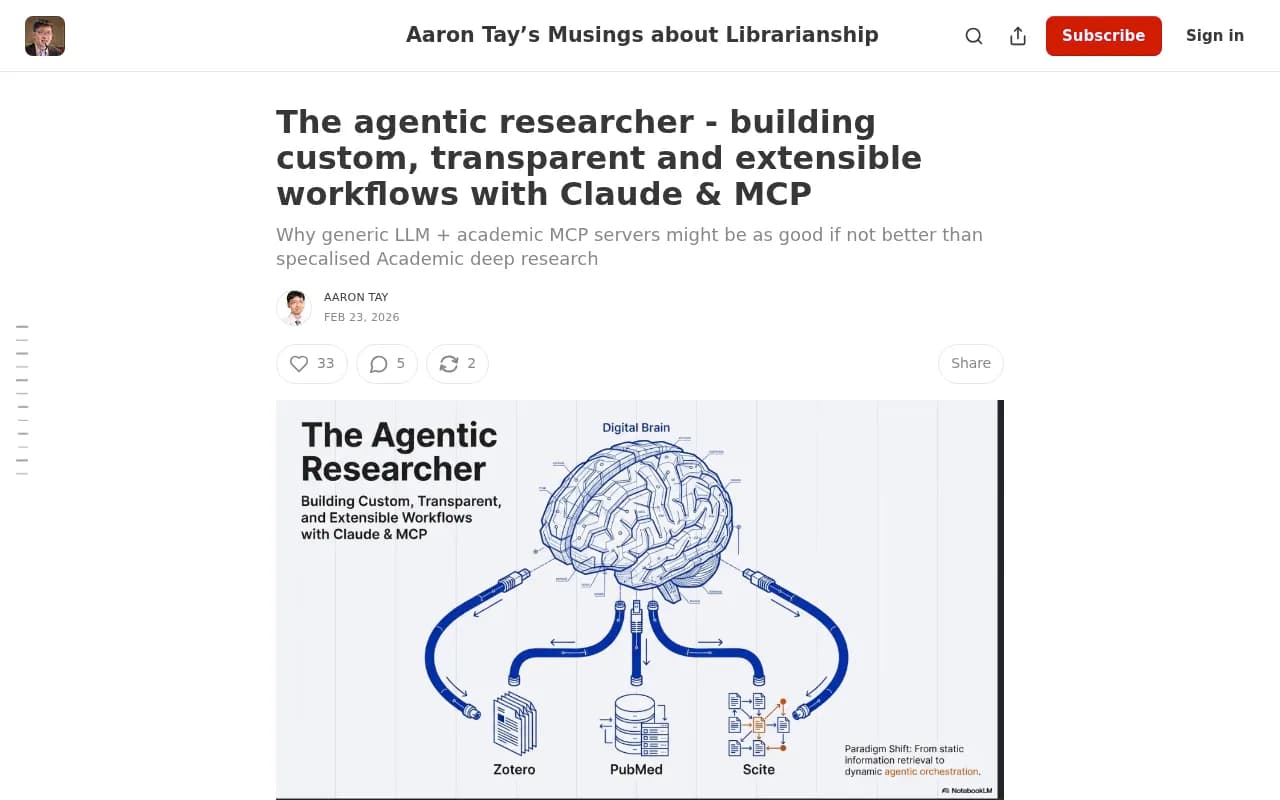
His material is about literature search, not AI visibility, but two cautions carry over. MCP support is still described as experimental, so features can change. And you should read the security notes before connecting anything to your data.
Which MCP server to use
A few AI visibility vendors now ship MCP servers. Two I could verify:
- Promptwatch has an official connector in the Claude directory and an official ChatGPT plugin, both powered by the same MCP server. Its docs list capabilities such as brand visibility across ChatGPT, Claude, Gemini, Perplexity and AI Overviews, citation source analysis, AI-referred traffic, competitor comparison and content gaps. The server launched in March 2026.
- Profound publishes an MCP server installed with
npx -y @profoundai/mcp. I did not verify its tool list or pricing, so check its docs before committing.


I will use Promptwatch for the examples because its read tools map cleanly onto a weekly review: visibility and sentiment time series, citations with rank analysis and top pages, Reddit and YouTube citations, prompts and responses, competitor heatmaps, content gaps and query fan-outs, site health, and crawler and visitor analytics. That is a lot of surface for one assistant to chain together. The same workflow adapts to any server that exposes comparable data.
If you want to browse more options first, the GEO software directory at bestgeosoftware.com and the rank tracker list at ai-rank-tools.com cover the field.
| Option | Connects to | Setup style | Notes |
|---|---|---|---|
| Promptwatch MCP | Claude, Claude Code, ChatGPT, Cursor, Lovable, Codex and other MCP clients | Directory connector or hosted MCP endpoint | Read tools for citations, traffic, crawlers; scoped permissions |
| Profound MCP | MCP-compatible clients | npx -y @profoundai/mcp | Local package install; verify tools and pricing yourself |
| Third-party hosted wrapper (e.g. Truto) | ChatGPT, Claude | Generated hosted server | Lets you restrict to read methods, filter by tag, set an expiry |
Setup: connect the server to Claude
I could not verify the exact click path in the Claude settings screens, so check the Claude directory listing for the current steps. The general shape is stable:
- Open Claude's connectors or integrations area and find the Promptwatch connector in the directory.
- Authorize it with your Promptwatch account.
- Start a new conversation and ask Claude what tools it can see from the connector. If it lists citation and visibility tools, you are connected.
If you work in Claude Code, Cursor or another MCP client instead, the integration docs at promptwatch.com/integrations/mcp cover the endpoint approach.
Scope permissions before you start
The integration lets an assistant query your data and act on it "within the scope you granted". Take that literally. For a reporting workflow you only need read access. Skip write tools until you have a reason for them.
If you go through a third-party wrapper, use its options: restrict to read methods, filter to the tags you need, and set an expiry date on the server. A token that quietly lives forever is the kind of thing that bites you six months later.
Before the weekly routine: set up your monitor
The workflow only works if the underlying prompts are stable. Spend an hour once, not every week.
- Pick 30 to 100 prompts that represent how buyers actually ask about your category: brand, competitor comparison and generic organic questions.
- Keep the set fixed. Adding prompts every week breaks comparisons.
- Record a baseline: visibility score, citation share, and your top cited pages.
- Note any recent ChatGPT model rollout. This matters for interpreting dips.
Prompt tracking tools that monitor the real ChatGPT interface, not just API outputs, give you results closer to what users see. Promptwatch does this, and so do some of the alternatives in our directory.
The weekly workflow
Block 30 minutes at the same time each week. Monday works because Promptwatch also sends its weekly digest email then, but any consistent slot is fine. Paste these prompts into one Claude conversation so the later answers can build on earlier ones.
Step 1: Week-over-week headline
Using my Promptwatch data, compare the last 7 days to the previous 7 days for ChatGPT only. Give me visibility score, citation share for my domain, and number of prompts where I was cited. Flag any change bigger than 20%.
The 20% threshold is arbitrary. Pick one that matches your volume. With 50 prompts, a swing of two or three is noise; with 300, it is probably real.
Step 2: Which pages gained or lost citations
List my 10 most-cited pages this week and the 10 pages that lost the most citations versus last week. For each, give the content type and the prompts involved.
This is where the MCP approach beats a dashboard. Claude can sort, group by page type, and tell you that your three losses are all blog posts from the same quarter, which a flat table would hide.
Step 3: Competitor movement
Which competitors gained citation share on my tracked prompts this week? For the biggest gainer, show which of their pages are being cited and for which prompts.
Page-level detail is what you want. "Competitor X is up 3 points" is trivia. "Competitor X's pricing comparison page started appearing in 11 prompts" is a task.
Step 4: Crawl and access check
For the pages that lost citations, did AI crawlers visit them in the last 7 days? Were there any crawl errors?
A page can lose citations simply because a crawler hit a 403 or a timeout. IP-verified crawler logs separate that from a content problem. If your server has no crawler data connected, this step will come back empty, which is itself a finding.
Step 5: Turn it into three actions
Based on everything above, give me three prioritized actions for this week. Each must name the page or prompt, the evidence, and the expected effect.
Cap it at three. Long action lists die in backlogs. Paste the output into your task tracker, or have Claude draft a short Slack-ready summary.
Weekly checklist at a glance
| Check | Question it answers | Typical signal |
|---|---|---|
| Headline metrics | Did overall visibility move? | Visibility score, citation share |
| Page gains and losses | Which assets drive citations? | Top cited and dropped pages |
| Competitor movement | Who is taking share, with what? | Competitor pages newly cited |
| Crawler access | Can AI actually read the pages? | Errors, missing visits |
| Source mix | Where do citations come from? | Reddit, YouTube, review sites, own domain |
Reading the results without fooling yourself
Dips are not always your fault
Promptwatch Data tracked a drop in average citations per response across GPT-5.3, GPT-5.4 and GPT-5-Mini around the GPT-5.3 rollout on March 4, 2026. If your numbers fall everywhere at once, suspect the platform. If only one page type or topic falls, suspect your content.
The same applies to retrieval changes. Promptwatch's data shows ChatGPT began using the site: operator at scale on August 8, 2026, jumping from about 0.4% to about 17% of fanout queries overnight. Behavior like that changes which pages get surfaced, and nothing on your site changed.
Third-party sources swing wildly
Reddit is the clearest example. Promptwatch's data shows reddit.com's share of ChatGPT citations fell from roughly 4% to 0.5% on August 14, 2026. An older Promptwatch snapshot from September 2025 showed a similar collapse from 10-14% to about 1% within days. If your strategy leaned on Reddit threads, a weekly check catches this early. Promptwatch's own advice from that data is to monitor citation share weekly so a platform change doesn't blindside you, and that is the reasoning behind this whole workflow.
Different content types age differently
In Promptwatch's content half-life study, every page ChatGPT cited on July 6, 2026 was tracked for 90 days to October 4. After 30 days ChatGPT still cited 78% of landing pages and 76% of docs; after 60 days, 69% and 67%. Product pages, reviews and how-tos had about 55% still cited after 60 days, with half-lives of 74 to 77 days. News decayed fastest: half its pages were gone after 36 days.
Practically, that means:
- News and timely posts: look at them every week and refresh or replace quickly.
- Product pages, reviews, how-tos: a check every few weeks is enough.
- Landing pages, docs, pricing: long-lived. Protect them and fix errors fast, but don't rewrite them for sport.
One caveat: the study's curves drop faster in the last week because the window ends, so the true half-lives of the long-lived types are probably near or beyond 90 days.
Fan-outs shape what gets cited
ChatGPT often runs several web searches per answer. Promptwatch's query fan-out data showed averages of about 2.15 searches per response in early December 2025, easing to about 1.84 by early March 2026, though single prompts can trigger far more. Ask Claude to pull the fan-out queries for prompts where you lost a citation. If the searches read like short queries such as "X vs Y pricing", your headings should probably read the same way. Promptwatch's suggestions: write headings that look like short search queries, lead titles with entity and category, and build focused pages for sub-questions like comparisons, pricing, and alternatives.
What gets cited in general
For context on what you are chasing: product pages were the most cited content type in ChatGPT at 22.4% of citations in the week of Sep 28 to Oct 4, 2026 (report), and almost half of responses cite 10 or more unique domains. Citations are crowded. A single answer rarely hands one site the whole slot.
Common mistakes
- Changing the prompt set mid-stream, which makes every trend line meaningless.
- Asking Claude vague questions like "how are we doing?" and getting a vague summary. Name the metric, the model and the date range.
- Trusting a single week. Look at two or three weeks before rewriting anything.
- Not checking Claude's numbers. It can misread a table. Spot-check one figure against the dashboard each week.
- Leaving write access on. Reporting needs none.
- Forgetting that connected MCP servers may be experimental and change without notice.
Automating it
Once the five prompts feel stable, save them as a reusable template. Promptwatch's own Agent Chat supports scheduled chats delivered to Slack, which can replace the manual Monday ritual. If you prefer your own stack, workflow tools like n8n or Zapier can post the weekly summary to a channel or spreadsheet.


Keep a human step in the loop, even if small. The point of the review is deciding what to do, and that part should stay yours.
Where this fits with the rest of your stack
An MCP-connected assistant sits on top of a tracker, it does not replace one. You still need something collecting daily responses from the real ChatGPT interface, plus crawler logs and traffic data so you can see what citations lead to. Many monitoring-only tools stop at the mention count. If you also need content creation and publishing, look for platforms that connect tracking to action. Promptwatch's Action Board and Content Agent do that, and the pattern is worth looking for in alternatives too.
For data on how AI search behaves more broadly, Promptwatch's research hub is a good place to calibrate expectations before you interpret a bad week.
A simple first month
- Week 1: connect the server, confirm tool access, lock your prompt set, record baselines.
- Week 2: run the five-step review for the first time. Expect to refine your prompts.
- Week 3: add the crawler check and fan-out lookup for any lost pages.
- Week 4: compare four weeks of data, pick the page type that most needs work, and ship one change.
Then leave it alone for a few weeks and see whether the change moved citations. That discipline is the actual value here. The MCP server just makes the loop short enough that you will keep doing it.