WhatConverts Review 2026
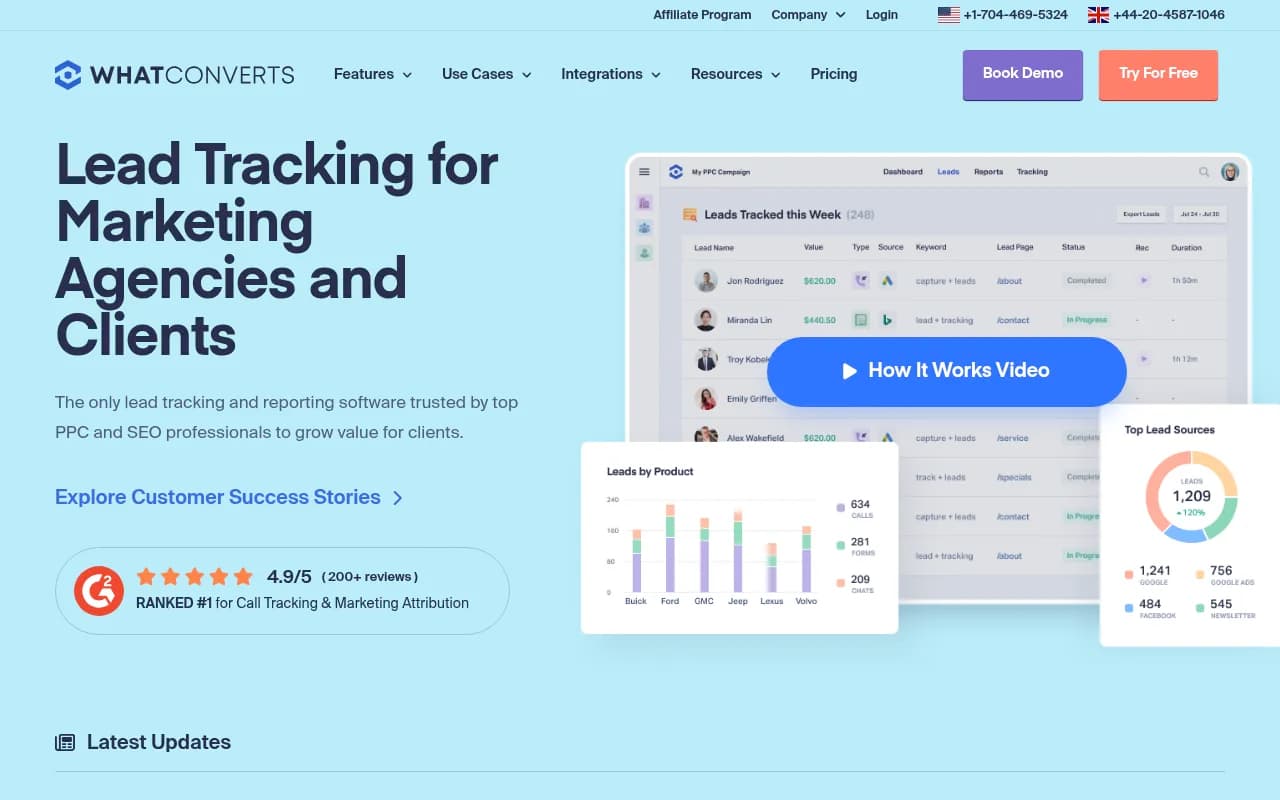
WhatConverts is a comprehensive lead tracking and attribution platform that captures calls, forms, chats, and eCommerce transactions, connecting each lead back to its marketing source. Built for agencies, marketers, and businesses running multi-channel campaigns, it reveals which PPC ads, keywords,
Key Takeaways
- Complete lead tracking: Captures phone calls (with recording and transcription), web forms, live chats, and eCommerce transactions with full marketing attribution for each conversion type
- Built for agencies: Unlimited client accounts on agency plans, white-label reporting, and scheduled reports make it easy to prove ROI to clients
- Multi-touch attribution: Elite plan tracks the entire customer journey across multiple touchpoints, showing every page view and marketing interaction before conversion
- Strong integrations: Native connections to Google Ads, Bing Ads, Facebook Ads, Google Analytics, and 1000+ tools via Zapier, plus a full API for custom workflows
- Honest limitations: No built-in CRM (requires integration), limited AI-powered features compared to newer platforms, and call tracking costs scale with volume
WhatConverts is a lead tracking and marketing attribution platform that solves a problem most marketers face daily: you know how many clicks your ads generated, but you have no idea which ones turned into actual customers. It captures phone calls, form submissions, live chats, and eCommerce transactions, then connects each lead back to the specific marketing source, campaign, keyword, and landing page that generated it. The platform is used by digital marketing agencies, in-house marketing teams, and multi-location businesses across industries like legal, healthcare, home services, real estate, and automotive.
Founded as a solution for agencies tired of cobbling together separate call tracking, form tracking, and analytics tools, WhatConverts has grown into a comprehensive attribution platform trusted by thousands of marketing professionals. It's ranked #1 on G2 for call tracking and marketing attribution with a 4.9/5 rating from 200+ reviews. The company is based in the United States with a UK presence, and it's built specifically for marketers who need to prove ROI to clients or stakeholders.
Lead Tracking Capabilities
WhatConverts tracks four main conversion types, each with detailed attribution data:
Call Tracking: Purchase local or toll-free tracking numbers instantly and assign them to specific marketing sources (Google Ads, Facebook, direct mail, billboards, etc.). Dynamic Number Insertion (DNI) automatically swaps the phone number on your website based on how the visitor arrived, so you can use a single number across all channels while still tracking the source of each call. Every call includes a recording, transcription, caller location, call duration, and the full marketing journey (referral source, landing page, keywords, UTM parameters). You can set up call flows to route callers to different departments based on the number they dialed or the time of day.
Form Tracking: Connect any web form on your site -- contact forms, quote requests, appointment schedulers, newsletter signups -- and WhatConverts captures the submission along with the marketing attribution. It works with popular form builders like Gravity Forms, Formstack, Formsite, Typeform, and custom HTML forms. You see exactly which campaign, keyword, and landing page drove each form submission, plus the visitor's full browsing history on your site before they converted.
Chat Tracking: Integrate with live chat platforms like Intercom, Drift, Olark, and others to capture chat conversations as leads. Each chat session includes the full transcript, visitor details, and marketing attribution. This is particularly useful for SaaS companies and service businesses where live chat is a primary conversion channel.
eCommerce Tracking: Track online purchases and transactions with revenue data attached. See which marketing channels and campaigns drive actual sales, not just traffic. This works for both traditional eCommerce sites and service businesses that accept online payments.
Every lead captured includes the visitor's full marketing journey: referral source (Google Ads, Facebook, organic search, direct, etc.), landing page URL, keywords (for paid search), UTM parameters, device type, location, and browsing history. On higher-tier plans, you get multi-touch attribution that shows every marketing touchpoint a visitor encountered before converting -- not just the last click.
Lead Management and Organization
All leads from all sources flow into a single dashboard where you can search, filter, qualify, and export them. The lead management system is designed to handle high volumes without getting messy:
Search and Filter: Find specific leads by date range, marketing source, campaign, keyword, lead type (call/form/chat), location, or custom fields. Save frequently used filters as presets for quick access. The search is fast even with thousands of leads.
Lead Qualification: Mark leads as qualified, unqualified, or pending review. Add notes, tags, and custom fields to each lead. Set up automated qualification rules (Lead Intelligence on Elite plan) that automatically score or categorize leads based on criteria you define -- for example, mark all calls under 30 seconds as unqualified, or flag form submissions from specific zip codes as high-priority.
Lead Valuation: Assign dollar values to leads based on type, source, or quality. This lets you calculate actual ROI for each marketing channel. For example, if you know a qualified legal consultation is worth $500 on average, you can assign that value to each qualified call and see which campaigns deliver the highest revenue, not just the most leads.
Export and Integration: Export leads to CSV for analysis in Excel or Google Sheets. Push leads to your CRM (Salesforce, HubSpot, Pipedrive, Zoho, etc.) via native integrations or Zapier. Use webhooks to send lead data to custom systems in real-time. The API is well-documented and supports both sending and receiving lead data.
Reporting and Analytics
WhatConverts includes pre-built marketing reports and a custom report builder for deeper analysis:
Marketing Reports: Out-of-the-box reports show leads by source, campaign, keyword, landing page, device, location, and time period. See which Google Ads campaigns deliver the most qualified leads, which keywords drive phone calls vs. form submissions, and how organic search compares to paid channels. Reports update in real-time as new leads come in.
Custom Report Builder (Pro plan and above): Build your own reports with drag-and-drop simplicity. Choose dimensions (source, campaign, keyword, lead type, etc.) and metrics (lead count, qualified leads, lead value, conversion rate). Add filters, group by multiple dimensions, and visualize data with charts and tables. Save custom reports and share them with team members or clients.
Scheduled Reports: Automatically email reports to stakeholders on a daily, weekly, or monthly schedule. This is a huge time-saver for agencies that need to send client reports regularly. Reports can be customized per client and include only the data they care about.
Marketing Intelligence: The platform surfaces insights automatically -- for example, it might flag that a specific keyword is driving a high volume of unqualified leads, or that a particular landing page has a much higher conversion rate than others. These insights help you optimize campaigns without manually digging through data.
Real-Time Reporting: See leads as they happen. The dashboard updates live, so you can monitor campaign performance during business hours and make adjustments on the fly. Get instant notifications (email, SMS, Slack) when high-value leads come in.
Integrations and Ecosystem
WhatConverts integrates natively with the tools marketers already use:
Ad Platforms: Google Ads, Bing Ads, Facebook Ads. Push conversion data back to these platforms so their algorithms can optimize for actual leads, not just clicks. This closed-loop integration improves campaign performance over time.
Analytics: Google Analytics (GA4 and Universal Analytics), Google Tag Manager. Send lead events to Analytics so you can see conversion data alongside traffic data. Use UTM parameters to track campaigns consistently across platforms.
CRMs: Salesforce, HubSpot, Pipedrive, Zoho CRM, and dozens more via Zapier. Automatically create or update CRM records when leads come in. Sync lead qualification status and notes back to WhatConverts.
Reporting Dashboards: AgencyAnalytics, Databox, Google Data Studio (Looker Studio). Pull WhatConverts data into client dashboards for unified reporting. The AgencyAnalytics integration is particularly popular with agencies.
Form Builders: Gravity Forms, Formstack, Formsite, Typeform, Wufoo, JotForm. Connect forms with a few clicks -- no manual coding required.
Chat Platforms: Intercom, Drift, Olark, LiveChat. Capture chat conversations as leads with full attribution.
Zapier: 1000+ integrations via Zapier. Connect WhatConverts to virtually any business tool -- email marketing platforms, project management software, spreadsheets, etc.
API: Full REST API for developers. Build custom integrations, pull lead data into proprietary systems, or push data from external sources into WhatConverts. The API documentation is clear and includes code examples.
Who Is It For
WhatConverts is built for three main audiences:
Digital Marketing Agencies: Agencies managing PPC, SEO, and multi-channel campaigns for 5-50+ clients. The agency plans include unlimited client accounts, so you can track leads for all clients in one platform without per-account fees. White-label reporting and scheduled reports make it easy to prove ROI to clients. Agencies in legal marketing, healthcare marketing, home services, and local SEO use WhatConverts to show clients exactly which campaigns deliver qualified leads. If you're tired of clients asking "What am I getting for my money?", this platform gives you the data to answer that question definitively.
In-House Marketing Teams: Marketing managers and directors at companies with 10-500 employees who run multi-channel campaigns (PPC, SEO, social, email, direct mail) and need to prove which channels deliver results. Common industries include legal (law firms tracking consultation requests), healthcare (medical practices tracking appointment bookings), home services (HVAC, plumbing, roofing companies tracking service calls), real estate (tracking buyer and renter inquiries), automotive (dealerships separating sales calls from service calls), and education (universities tracking enrollment inquiries). If your company spends $10k+/month on marketing and you can't definitively say which channels work, WhatConverts solves that problem.
Franchises and Multi-Location Businesses: Brands with 5-100+ locations that need to track marketing performance across all locations in one platform. Each location gets its own account with separate tracking numbers and reports, but corporate can see aggregate data across all locations. This is useful for franchise systems where corporate runs national campaigns and franchisees run local campaigns -- you can see which campaigns work best at which locations.
WhatConverts is NOT ideal for: (1) Businesses that only care about eCommerce transactions and already have robust Google Analytics eCommerce tracking set up -- you don't need call tracking if you don't get phone calls. (2) Enterprise companies with complex custom attribution models that require data science teams -- WhatConverts is powerful but not infinitely customizable. (3) Businesses on a tight budget with very low lead volume (under 50 leads/month) -- the cost may not justify the insights at that scale.
Pricing and Value
WhatConverts uses a subscription model with pay-as-you-go flexibility. Pricing is divided into plans for individual businesses and plans for agencies:
Individual Business Plans (one account):
- Call Tracking: $30/month. Includes call tracking and recording, dynamic number insertion, instant tracking numbers, API access. Good for businesses that only need to track phone calls.
- Plus: $60/month. Adds form tracking, chat tracking, campaign and keyword reporting, integrations with Google Ads, Bing Ads, and Google Analytics. This is the entry point for full multi-channel tracking.
- Pro: $100/month. Adds call flows (route callers to departments), custom report builder, scheduled reports, HIPAA compliance. Best for businesses that need advanced reporting or operate in regulated industries.
- Elite: $160/month. Adds multi-touch attribution (full customer journey tracking), pages visited tracking, and Lead Intelligence (automated lead qualification rules). Best for businesses with complex sales cycles or high lead volumes.
Agency Plans (unlimited client accounts):
- Plus: $500/month. Same features as individual Plus plan, but for unlimited clients.
- Pro: $800/month. Same features as individual Pro plan, unlimited clients.
- Elite: $1,250/month. Same features as individual Elite plan, unlimited clients.
All plans include a 14-day free trial with no credit card required. You can cancel anytime. Tracking numbers cost extra -- local numbers are typically $1-2/month each, toll-free numbers are $2-3/month. Call and text message usage is billed separately based on volume (typically $0.01-0.03 per minute for calls, $0.01-0.02 per text message).
How It Compares: WhatConverts is priced competitively with other call tracking platforms like CallRail, CallTrackingMetrics, and DialogTech. The main difference is that WhatConverts includes form tracking, chat tracking, and eCommerce tracking in the base price, whereas competitors often charge extra for those features or don't offer them at all. For agencies, the unlimited client accounts model is a huge cost saver compared to platforms that charge per account.
Value Assessment: If you're spending $5k+/month on marketing and you don't know which channels deliver qualified leads, WhatConverts pays for itself quickly. The ability to cut underperforming campaigns and double down on winners typically saves more than the subscription cost within the first month. For agencies, the time saved on client reporting and the ability to prove ROI (which reduces churn) makes the investment worthwhile.
Strengths
- All-in-one tracking: Captures calls, forms, chats, and transactions in one platform. You don't need separate tools for each conversion type.
- Agency-friendly: Unlimited client accounts on agency plans, white-label reporting, and scheduled reports make it easy to manage multiple clients.
- Strong integrations: Native connections to Google Ads, Bing Ads, Facebook Ads, and Google Analytics. Closed-loop conversion tracking improves ad performance.
- Call quality: Call recordings and transcriptions are clear and accurate. The transcription quality is better than most competitors.
- Customer support: Highly rated for responsive, knowledgeable support. Live chat and phone support available during business hours.
Limitations
- No built-in CRM: WhatConverts is a tracking and reporting tool, not a CRM. You'll need to integrate with Salesforce, HubSpot, or another CRM to manage leads after they're captured. Some competitors (like CallRail) include basic CRM features.
- Call tracking costs scale with volume: While the base subscription is reasonable, high call volumes can get expensive. If you're tracking 10,000+ calls per month, the per-minute charges add up. Competitors like CallTrackingMetrics offer flat-rate plans for high-volume users.
- Limited AI features: The platform doesn't include AI-powered lead scoring, sentiment analysis, or predictive analytics. Newer competitors are starting to add these features.
- Learning curve for advanced features: The basic tracking setup is straightforward, but features like multi-touch attribution, custom report builder, and Lead Intelligence require time to learn and configure properly.
Bottom Line
WhatConverts is the right choice for digital marketing agencies managing 5+ clients, in-house marketing teams running multi-channel campaigns with budgets over $5k/month, and multi-location businesses that need centralized lead tracking. It's particularly strong for industries where phone calls are a primary conversion channel -- legal, healthcare, home services, real estate, automotive. The combination of call tracking, form tracking, and chat tracking in one platform eliminates the need for multiple tools, and the agency pricing model (unlimited client accounts) is hard to beat. If you need to prove marketing ROI to clients or stakeholders and you're tired of guessing which campaigns work, WhatConverts gives you the data to make confident decisions. Best use case in one sentence: agencies and businesses that need to track phone calls, forms, and chats back to specific marketing sources and prove which campaigns deliver qualified leads.
Frequently asked questions
What is WhatConverts and what does it do?
How much does WhatConverts cost?
Is WhatConverts free to use?
Who is WhatConverts best for?
What types of leads can WhatConverts track?
Does WhatConverts integrate with Google Ads and Facebook Ads?
Does WhatConverts have a built-in CRM?
What is multi-touch attribution in WhatConverts?
Is WhatConverts good for marketing agencies?
Does WhatConverts offer call recording and transcription?
Similar and alternative tools to WhatConverts