CoSchedule Marketing Suite Review 2026
Marketing calendar platform that helps teams plan, schedule, and execute content campaigns across channels, with social publishing and project management built in.
Key takeaways
- CoSchedule is a well-established marketing calendar platform used by 100,000+ marketers, with customers including Forbes, Yamaha, Unicef, Walgreens, and Procter & Gamble
- Offers four distinct product tiers: Social Calendar (solopreneurs), Agency Calendar ($59/user/month), Content Calendar (mid-sized teams), and Marketing Suite (enterprise)
- Strong social publishing, campaign planning, and workflow management in a single calendar view
- Comes with companion tools: Hire Mia (AI writing assistant) and Headline Studio (AI headline analyzer)
- Free plan available for the Social Calendar tier; paid plans start at $59/user/month for agencies
- Not a fit for teams whose primary need is deep analytics, advanced CRM integration, or AI search visibility
CoSchedule has been around long enough to have earned a real reputation. Founded in 2013 in Bismarck, North Dakota, it started as a WordPress plugin that let bloggers schedule content directly from their CMS. Over the years it grew into a full marketing calendar platform, and today it covers social publishing, content planning, team workflows, and basic reporting under one roof. The company claims over 100,000 marketers use it daily, and the customer list includes some recognizable names: Forbes, Yamaha, Unicef, Walgreens, and Procter & Gamble.
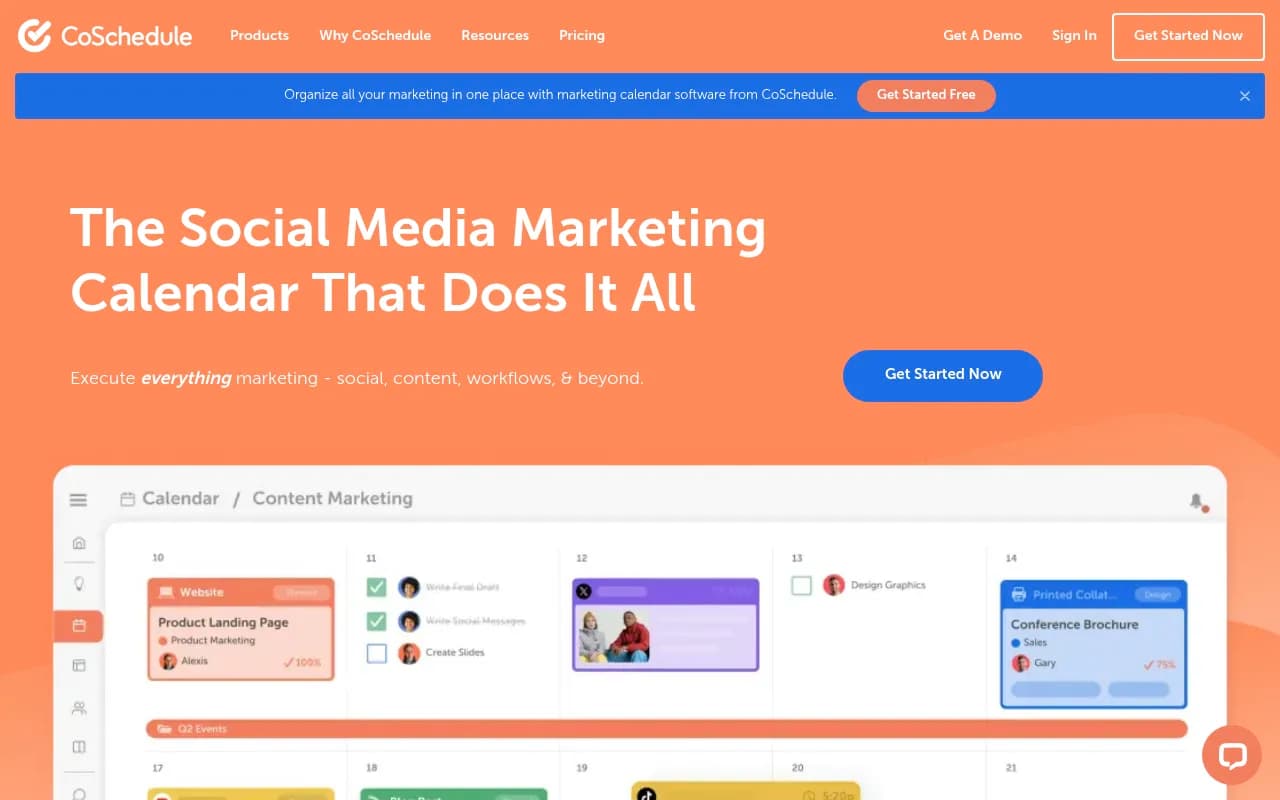
The core pitch is simple: marketing gets messy when your social calendar lives in one tool, your blog editorial calendar lives in a spreadsheet, and your campaign tasks are scattered across email threads. CoSchedule tries to pull all of that into a single visual calendar. It's not trying to be the deepest analytics platform or the most powerful project management suite. It's trying to be the one place your marketing team actually looks at every morning.
The target audience spans a wide range. Solopreneurs and small business owners use the Social Calendar to schedule posts weeks in advance without thinking about it. Agencies use the Agency Calendar to manage separate client calendars without everything bleeding together. Mid-sized in-house marketing teams use the Content Calendar for campaign visibility. And enterprise teams use the full Marketing Suite to tie marketing work to company goals. That range is both a strength and a source of occasional confusion -- the product lineup has evolved enough that it can take a few minutes to figure out which version you actually need.
Key features
Marketing calendar view The calendar is the center of everything. You get a visual, drag-and-drop interface that shows social posts, blog content, email campaigns, events, and tasks in a single timeline. You can filter by project, team member, channel, or campaign. The calendar supports monthly, weekly, and list views, which matters when you're trying to get a high-level read on a busy month versus drilling into a specific week's execution. Compared to tools like Hootsuite or Buffer, which are primarily social schedulers with calendar views bolted on, CoSchedule's calendar feels more like a genuine planning workspace.
Social publishing CoSchedule connects to all major social networks: Facebook, Instagram, LinkedIn, Twitter/X, Pinterest, TikTok, and YouTube. You can write posts, attach media, set publish times, and queue up content directly from the calendar. The ReQueue feature (available on higher tiers) automatically recycles your best-performing evergreen content into open slots in your queue, which is genuinely useful for teams that don't want to manually reshare old posts. Social profiles are sold in bundles, with additional profiles available for $5/month each on lower tiers.
Social Inbox The Social Inbox consolidates DMs, comments, and replies from connected social accounts into a single feed. You can respond without leaving CoSchedule, assign conversations to team members, and mark threads as resolved. It's not as full-featured as a dedicated social listening tool like Sprout Social, but for teams that don't need deep sentiment analysis, it covers the basics without requiring a separate subscription.
Campaign and project management Beyond social, CoSchedule handles broader marketing projects. You can create campaigns that contain multiple content pieces, assign tasks to team members, set deadlines, and track progress. The Content Calendar tier adds Kanban and table views for task management, which makes it more useful for teams running complex multi-channel campaigns. Custom workflows let you define approval stages, which is important for teams where content needs sign-off before publishing.
Custom reporting CoSchedule includes a reporting module where you can build custom dashboards to track social performance, campaign progress, and team output. You can pull in metrics from connected social accounts and visualize them alongside your calendar activity. The reporting isn't as deep as a dedicated analytics tool, but it's enough to show stakeholders what the marketing team shipped and how it performed.
Hire Mia (AI writing assistant) Hire Mia is CoSchedule's AI writing tool, positioned as a "collaborative AI editor." It's designed to help marketers draft social posts, blog content, email copy, and other marketing assets faster. The framing is that it works alongside you rather than replacing you, with an interface that feels more like a co-editing session than a simple prompt box. It's available as a standalone product and also integrated into the broader CoSchedule ecosystem.
Headline Studio Headline Studio is a separate but connected tool that scores headlines based on engagement potential and SEO factors. You type a headline, it gives you a score and specific suggestions for improvement. It uses a combination of AI analysis and data from real headline performance. Writers and content marketers who publish a lot of blog content find this genuinely useful -- it's one of those tools that sounds gimmicky until you actually use it and realize your headlines were worse than you thought.
Agency Calendar The Agency Calendar is worth calling out specifically because it solves a real problem: agencies managing multiple clients need separate calendars that don't bleed into each other, but they also need a single login. The Agency Calendar gives you client-specific workspaces at $59/user/month, which is competitive for what you get. Freelancers and small agencies managing 5-20 clients are the sweet spot here.
Actionable Marketing Institute CoSchedule also runs an on-demand marketing course library called the Actionable Marketing Institute (AMI). It's a separate product but bundled into some higher-tier plans. For teams that want to upskill alongside using the tool, it's a nice addition -- though most buyers won't choose CoSchedule primarily for the training content.
Who is it for
The clearest fit is in-house marketing teams at mid-sized companies (think 5-50 person marketing departments) that are currently managing their editorial calendar in a spreadsheet and their social scheduling in Buffer or Hootsuite. If you're spending time every week reconciling what's going out on social with what's being published on the blog and what campaigns are running in email, CoSchedule's unified calendar view solves that problem directly. A digital marketing manager at a regional retailer, a content team at a B2B SaaS company, or a marketing coordinator at a nonprofit are all natural users.
Agencies and freelancers managing multiple client accounts are another strong fit, specifically because of the Agency Calendar's client-separated workspace model. If you're a freelance social media manager handling 8-10 clients, or a small agency with a team of 3-5 managing 15 clients, the per-client calendar structure is cleaner than trying to filter everything in a shared workspace.
Solopreneurs and small business owners who just need to get their social posting organized without a lot of complexity are well served by the free Social Calendar tier. It's not the most powerful tool in this category, but it's approachable and doesn't require a learning curve that takes weeks to climb.
Who should probably look elsewhere: enterprise teams that need deep CRM integration, advanced attribution modeling, or sophisticated analytics will find CoSchedule's reporting too lightweight. Teams primarily focused on SEO or content performance measurement will want to pair it with (or replace it with) more specialized tools. And teams whose main challenge is AI search visibility -- understanding how they appear in ChatGPT, Perplexity, or Google AI Overviews -- won't find anything relevant here; that's a different category of tool entirely.
Integrations and ecosystem
CoSchedule connects to a solid range of marketing tools. On the social side, it covers Facebook, Instagram, LinkedIn, Twitter/X, Pinterest, TikTok, and YouTube. For content, it integrates with WordPress (its original integration), which remains one of the tighter CMS connections in this category. It also connects with Google Docs, Evernote, and Dropbox for content creation workflows.
For project management and communication, there are integrations with tools like Zapier (which opens up connections to hundreds of other apps), Google Analytics for performance data, and various email marketing platforms. The GitHub presence (github.com/CoSchedule) suggests some developer-facing work, though CoSchedule is primarily a no-code tool for marketers rather than a developer platform.
The Hire Mia and Headline Studio products are available as standalone tools with their own interfaces, but they're also accessible within the CoSchedule calendar workflow, which reduces context switching for teams already in the platform.
There's no dedicated mobile app mentioned prominently in current materials, which is a gap for marketers who need to approve or publish content on the go. Browser-based access works on mobile, but it's not the same experience as a native app.
Pricing and value
CoSchedule's pricing structure is tiered by use case rather than just by feature count, which makes it easier to find the right fit but also means you need to understand which product you're buying.
- Social Calendar: Free tier available. Includes social publishing for a limited number of profiles, basic scheduling, and calendar view. Good for solopreneurs who just need to get organized.
- Agency Calendar: $59/user/month. Designed for agencies and freelancers managing multiple client calendars. Includes 5 social profiles per client calendar, with additional profiles at $5/month each.
- Content Calendar: Pricing not publicly listed on the main site; requires contacting sales or signing up to see. Targets mid-sized marketing teams needing full campaign management, Kanban views, and custom workflows.
- Marketing Suite: Enterprise pricing, custom. Includes the full product family, team management, advanced reporting, and access to AMI Pro training content.
Compared to competitors: Buffer's paid plans start around $6/month per channel, making it cheaper for pure social scheduling but without the campaign management layer. Hootsuite's professional plans run $99-$249/month depending on features. Sprout Social starts at $249/month per seat, which is significantly more expensive but also significantly deeper on analytics and social listening. CoSchedule sits in a reasonable middle ground for teams that need more than a social scheduler but don't need Sprout Social's full feature set.
The free Social Calendar tier is a genuine free product, not a crippled trial. That's worth noting because many tools in this category offer "free trials" that expire rather than a usable free tier.
Strengths and limitations
What it does well:
- The unified calendar view is genuinely useful. Having social posts, blog content, campaigns, and tasks in one visual timeline reduces the coordination overhead that plagues marketing teams working across multiple tools.
- The Agency Calendar's client-separated workspace model is well thought out. It's one of the cleaner solutions to the multi-client management problem in this price range.
- The ReQueue feature for evergreen content recycling is a practical time-saver that tools like Buffer and Hootsuite don't match as cleanly.
- Headline Studio is a legitimately useful standalone tool that happens to be bundled in, adding real value beyond the calendar itself.
- The free Social Calendar tier is usable, not just a teaser.
Honest limitations:
- Reporting and analytics are surface-level. Teams that need to understand content performance in depth will need to pull data into a separate analytics tool. This is a consistent complaint in user reviews.
- The product lineup (four different calendar products plus Hire Mia plus Headline Studio plus AMI) can be confusing to navigate. New users sometimes spend time figuring out which product they're actually buying before they can evaluate whether it fits.
- No meaningful AI search visibility features. As more marketing teams start caring about how their brand appears in ChatGPT, Perplexity, and Google AI Overviews, CoSchedule has nothing to offer in that space. It's a traditional content calendar, not an AI search optimization tool.
- Mobile experience is limited compared to native apps from competitors like Buffer or Later.
- Pricing transparency is inconsistent -- the Content Calendar and Marketing Suite tiers require contacting sales, which slows down evaluation for teams that want to self-serve.
Bottom line
CoSchedule is a solid, mature marketing calendar platform that earns its place for in-house marketing teams and agencies that need to coordinate social publishing, content planning, and campaign workflows in one place. It's not trying to be the deepest tool in any single category, and it doesn't need to be -- the value is in the coordination layer it provides across channels and team members.
Best use case in one sentence: a mid-sized marketing team that's currently juggling a social scheduler, an editorial spreadsheet, and a project management tool and wants to consolidate into one visual workspace without paying Sprout Social prices.
Tags:
Frequently asked questions
What is CoSchedule?
Is there a free plan for CoSchedule?
How much does CoSchedule cost?
What social networks does CoSchedule support?
How does CoSchedule compare to Buffer or Hootsuite?
What is Hire Mia?
Similar and alternative tools to CoSchedule Marketing Suite