Key takeaways
- Coding agents skip APIs they can't find, can't read, or can't authenticate against. Brand awareness matters far less than machine-readable docs.
- Many agent fetch tools read the raw server response and never run JavaScript, so a docs site that looks fine to you can be an empty shell to an agent.
- Models invent endpoints. A 2025 benchmark cited by Nango found hallucinated endpoint URLs up to 39% of the time and wrong parameter names up to 31%.
- Fixes are mostly boring: crawlable HTML, stable URLs, an llms.txt, markdown routes for docs, an OpenAPI spec, and an MCP server.
- Measure it. Crawler logs tell you whether agents reach your docs at all, which is the first question to answer.
Why this problem exists
A developer asks Claude Code to add payments, send email, or pull analytics. The agent doesn't browse a comparison site and weigh brand reputation. It searches, fetches a few pages, reads whatever it can parse, and writes code. If your product isn't in that path, or is in it but unreadable, the agent picks someone else or writes a worse integration against yours.
I should be upfront about what is and isn't known. I found no official Claude Code documentation covering exactly how its fetch tools behave, and no first-party report on its recommendation patterns. What exists is circumstantial but consistent: crawl logs, vendor benchmarks, and developer write-ups. Treat the list below as a diagnostic checklist built from that evidence, not a description of Claude Code internals.
One data point is hard to ignore. Promptwatch reported in its Markdown in AI Search report (published Feb 19, 2026, based on seven days of citations) a big uptick in docs crawling by Claude's bot and OpenAI's bot. Its crawl log shows those bots requesting specific /docs/.../*.md paths, with the top path seeing 3,241 requests. Agents fetch specific docs, READMEs, and API references. They are reading developer documentation at scale, and they are picky about what they can read.

Reason 1: Your docs are an empty JavaScript shell
Mintlify's agent-discovery guide (October 2026) points out that many agent fetch tools read the server response without running browser JavaScript. A human sees your rendered docs. The agent sees <div id="root"></div> and a bundle URL.
Promptwatch's markdown report makes the same warning: if pages depend on client-side JavaScript, a retrieval system may not parse them, and you should fix that first.
A quick test:
curl -s https://yourdocs.com/api/reference | head -50
If you can't find the endpoint names in that output, an agent probably can't either. Server-side render or statically generate your reference pages.
Reason 2: Bots hit a block page or a challenge
Mintlify lists crawl access as its own failure layer. The agent gets a block page, an interactive bot challenge, or an empty shell. Plenty of teams turn on aggressive bot protection to stop scrapers and accidentally lock out the agents they want.
Check your CDN and WAF rules against the AI crawlers you actually want. The AI bots and web crawlers directory lists 400+ of them with robots.txt guidance, and the robots.txt generator for AI helps you write rules without guessing. Remember that user-triggered agents (the ones fetching on behalf of a developer) behave differently from training crawlers, so a blanket block hurts more than you expect.
Reason 3: No llms.txt, or one that doesn't help
Mintlify's benchmark observed Claude Code and Codex requesting .md and /llms.txt URLs that the test sites didn't serve. Each failed request is wasted work, and the agent falls back to guessing.
The file types do different jobs:
| File | What it holds | Weakness |
|---|---|---|
| llms.txt | Titles, descriptions, links | Agent must follow links to read docs |
| llms-full.txt | All page content in one file | Can exceed context limits |
| sitemap.xml | URL list | No task descriptions |
Details that trip teams up, per Mintlify's notes:
- If docs live at
example.com/docs, a reverse proxy has to forward/llms.txtand/llms-full.txt. - A generated llms.txt over 100,000 characters splits into
/_llms/files, and your path allowlist must forward those too. - Page descriptions should state the task and scope, like the API version or SDK. Mintlify truncates the first paragraph at 300 characters, so distinguishing details go first.
- Generated indexes cover only the default language and version, and hidden pages are excluded.
If you don't have a file yet, the LLMs.txt generator or a validator like llmtxt.info gets you started.
Reason 4: Markdown routes don't exist
When the only format is HTML, the agent has to dig instructions out of navigation, footers, and cookie banners. That is overhead, and it burns context.
Here's the nuance that most GEO advice gets wrong. Markdown is for agents, not for AI search. Across ChatGPT, Claude, Perplexity, and AI Overviews, HTML made up 99.94% of citations in Promptwatch's data, and markdown files only 0.05%. So don't build .md mirrors of your marketing pages. Do serve them for developer docs, where the agent is fetching one specific reference page to write code.
Reason 5: Agents can't find the right page
Mintlify names several discovery failures that have nothing to do with content quality:
- The documentation index sends the agent to an unrelated page.
- The landing page has no route to information that lives elsewhere.
- Old links redirect to missing pages.
This one is a plain information architecture problem. Run a crawl of your docs and look for orphan pages, redirect chains, and 404s. A crawler such as Screaming Frog does this in minutes.
Also check that your quickstart links to the reference, the reference links to auth, and auth links to examples. An agent that lands on the quickstart and can't get further will improvise.
Reason 6: The agent's training data is stale
This is the uncomfortable one, because it persists even when your docs are perfect. Nango's 2026 write-up says agents rely on stale training data and invent endpoints. The benchmark it cites (arXiv 2509.20172) measured hallucinated endpoint URLs up to 39% of the time and wrong parameter names up to 31%. Nango sells integration infrastructure, so weigh its framing accordingly, but the benchmark itself is independent.
What helps is giving the agent current context at the moment it writes code:
| Approach | What it does | Cost (per Nango) |
|---|---|---|
| Context7 (Upstash) | Serves current library docs to the agent over MCP | Free for 1,000 calls/month, Pro $10/seat/month |
| Apidog MCP server | Serves your OpenAPI spec as context | Free, open source |
| Speakeasy Gram | Turns an OpenAPI spec into hosted MCP tools | Free tier of 1,000 tool calls |
| Official provider MCP servers | First-party access (GitHub, Atlassian, AWS) | Free |
| Agent skills (agentskills.io) | Reusable instructions for integrations | Free |
If your product isn't indexed in a docs-for-agents service, getting listed is a cheap win. Publish a clean OpenAPI spec first, because most of these routes depend on it.
Reason 7: Auth is a wall the agent can't climb
Nango lists four things an agent lacks: current API knowledge, auth and credentials, a test loop against the real API, and a runtime for maintenance. Auth is where many integrations die. Agents can't complete OAuth consent screens or register OAuth apps. If the only way to try your API is a multi-step dashboard flow with email verification, the agent either stops or tells the developer to do it by hand, and the developer says "just use the other one."
Two practical fixes:
- Offer an API key path with a sandbox that works in one step. Make the key creation page documented and linkable.
- If your docs are gated, don't make them invisible to the developer's own agent. Mintlify offers an authenticated search MCP server at
/authed/mcpfor exactly this case.
Also, publish where agents can find your auth rules. Discovery headers Mintlify suggests include:
Link: </llms.txt>; rel="llms-txt"
Link: </.well-known/api-catalog>; rel="api-catalog"
Link: </.well-known/mcp/server-card.json>; rel="mcp-server-card"
X-Llms-Txt: /llms.txt
These standards are young. I wouldn't claim that Claude Code reads every one of them today. They cost little to add, and the Agentic Readiness Check shows which of these agent standards your site already supports.
Reason 8: Using your product feels risky to the developer
This one is about the human in the loop. Developers set up Claude Code with permissions, and they get nervous about handing an agent a production key.
Two write-ups are worth reading. Ana Bildea shared findings from Lakera on LinkedIn: Claude Code stores approved shell commands in .claude/settings.local.json, and when someone clicks "allow always" on a command containing a token, it persists there. Lakera scanned npm and found roughly 1 in 13 of the shipped settings files contained credentials, including npm tokens, GitHub tokens, and production bearer tokens. The fix is a line in .npmignore:
.claude/
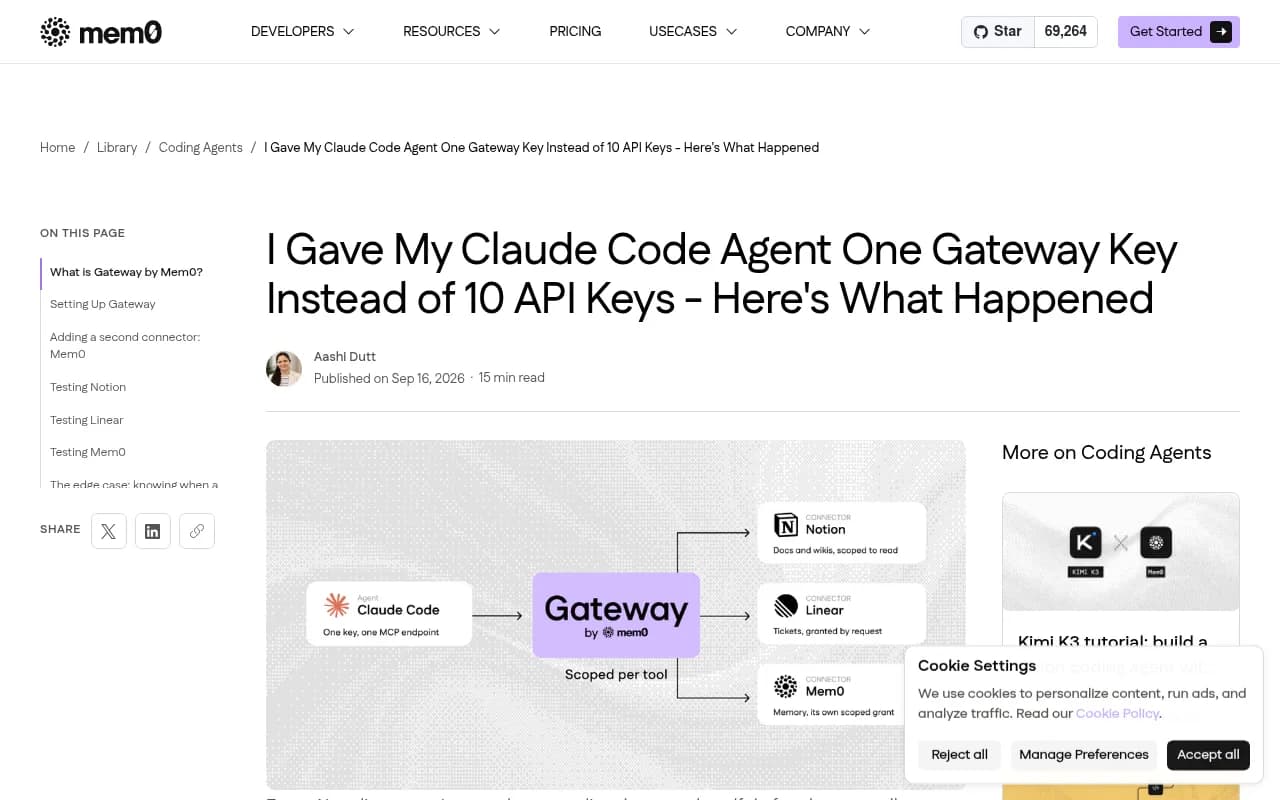
And run npm pack --dry-run before publishing. Separately, a Mem0 post by Aashi Dutt describes giving an agent one gateway key that only reaches the tools granted to it, instead of a full key per service, because a key doesn't distinguish between searching a Notion page and archiving one.
What this means for you as an API vendor: scoped keys, read-only keys, and clear permission docs make your product the safer thing to hand an agent. If your only option is an all-powerful secret, you are the riskier pick, and developers notice.
How to check whether agents reach you at all
Before fixing all eight, find out which one is actually your problem. The signal is in your server or CDN logs. You want to see which AI user agents request your docs, which paths they hit, and where they get errors.
- Promptwatch's AI crawler logs are IP-verified, so spoofed bots are filtered out, and show errors per page with plain-language explanations. It also tracks how Codex, Claude Code, and OpenCode recommend tools, SDKs, and docs, which is the closest thing to a direct answer for developer-tool companies.
- DarkVisitors is a lighter option focused on tracking AI agents and bots visiting a site.
Look for patterns. Lots of 404s on /llms.txt and .md paths means reasons 3 and 4. Requests that stop at the landing page suggest reason 5. Zero agent traffic with a healthy human traffic line points at reason 2.
For the broader picture, Promptwatch's software citation data for ChatGPT (Sep 28 to Oct 4, 2026) is a useful sanity check, even though it covers ChatGPT and not coding agents. GitHub led at 1.2% of software citations, followed by learn.microsoft.com at 0.98% and G2 at 0.73%. Docs and help centers were the largest source type at 2.64%, and vendor sites and docs together earned about three times the share of review sites. The takeaway: crawlable docs, a public GitHub presence, and current G2 and Capterra profiles are where developer-tool visibility comes from.
If you want to see how your product shows up in AI answers beyond coding agents, the GEO software directory at bestgeosoftware.com lists alternatives worth comparing.
A prioritized fix list
Don't try to do everything in a week. This order gives the best return for the least effort:
- Run
curlon three key doc pages and confirm the content is in the raw HTML. - Check your WAF and robots rules against the agents you want.
- Add llms.txt, with task-focused descriptions, and make sure your proxy forwards it.
- Serve markdown routes for docs only.
- Publish a clean OpenAPI spec, then an MCP server or a hosted wrapper around it.
- Add a one-step sandbox key and document scoped keys.
- Fix redirects and orphan pages in the docs.
- Watch crawler logs for a month and see which errors go away.
The 90-day GEO program in Promptwatch's academy is a decent frame if you want a longer schedule, and the free trial is the quickest way to get crawler logs flowing. Check pricing for current plans, since crawler logs aren't on every tier.
What I'd do first
Most teams I'd expect to be invisible are invisible for dull reasons: a JavaScript docs app, a bot challenge on the docs domain, or no machine-readable index. Fix those before you spend a minute on positioning. An agent that can read your reference page and call your sandbox in one step will use you. An agent that can't will quietly pick someone else, and you will never see a complaint about it.