Key takeaways
- AI search tracking requires a different setup than traditional keyword tracking — you're monitoring citations and mentions across multiple LLMs, not just ranking positions on one search engine
- The right prompt selection matters more than the volume of prompts you track; start with 20-40 well-chosen prompts before scaling
- Promptwatch connects the full loop: from seeing which prompts cite your brand, to identifying content gaps, to attributing actual clicks and traffic back to AI sources
- Traffic attribution is the step most teams skip — and it's what separates useful data from a vanity dashboard
- The setup process takes under an hour; the payoff is knowing exactly which AI models are sending you traffic and which are ignoring you
AI search is no longer a future concern. ChatGPT, Perplexity, Claude, and Gemini are actively answering your customers' questions right now — and either citing your brand or citing a competitor. Most marketing teams have no idea which one is happening.
This guide walks through the complete setup process in Promptwatch: from creating your first monitor to connecting traffic attribution so you can see the full journey from AI citation to actual website click.

Understanding what you're actually tracking
Before touching any settings, it helps to be clear on what AI search tracking measures — because it's genuinely different from what most SEO tools do.
Traditional rank tracking asks: "Where does my page appear for this keyword on Google?" The answer is a position number (1, 5, 23) and you check it daily.
AI search tracking asks: "When someone asks an LLM a question related to my product, does the AI mention my brand, cite my page, or recommend a competitor?" The answer is more nuanced — it includes whether you were mentioned, how prominently, whether a link was included, and what the AI actually said about you.
The two key metrics to understand:
- Brand mentions: The AI response includes your brand name somewhere in the text
- Citations: The AI response includes a direct link to one of your pages as a source
Citations matter more for traffic. Mentions matter more for brand perception. You want both, but they require different content strategies to earn.
A third thing worth tracking: prompt visibility score, which is essentially your share of voice across a set of prompts. Promptwatch calculates this automatically once your monitor is running.
Step 1: Create your monitor
Log into Promptwatch and navigate to the Monitors section. Click "New Monitor" and you'll be asked for a few basics:
- Your website URL
- Your brand name (and any common variations or misspellings)
- Your main competitors (add at least 3-5 for useful comparison data)
- Your industry/category
The brand name field is more important than it looks. If your brand is "Acme Corp" but people also call it "Acme" or "Acme Corporation," add those variants. LLMs are inconsistent about which form they use, and you don't want to miss mentions because of a capitalization difference.
For competitors, be honest with yourself about who you're actually competing against in AI responses — not just who you compete with for Google rankings. Sometimes the brands winning in AI answers are different from the ones dominating traditional search.
Step 2: Choose your prompts carefully
This is where most teams go wrong. They either track too few prompts (and miss most of their AI visibility picture) or they track too many generic prompts (and get data that doesn't reflect real customer intent).
The goal is to track prompts that real customers actually ask AI engines. Not the prompts you wish they asked. Not the prompts that sound good in a board presentation.
The three prompt categories you need
Branded prompts — questions that include your brand name directly. Examples: "Is [Brand] worth it?", "How does [Brand] compare to [Competitor]?", "What are [Brand]'s pricing plans?" These tell you how AI models talk about you when someone already knows your name.
Category/unbranded prompts — questions about your product category without mentioning any brand. Examples: "What's the best project management software for small teams?", "How do I track AI search visibility?" These are where you win or lose new customers who don't know you yet.
Competitor comparison prompts — questions that pit you against specific rivals. Examples: "Promptwatch vs Otterly.AI", "[Competitor] alternatives", "Which is better: X or Y?" These are high-intent prompts where someone is actively deciding.
A reasonable starting point: 8-10 branded prompts, 15-20 unbranded category prompts, and 5-10 competitor comparison prompts. That's roughly 30-40 total — enough to get a real picture without burning through your prompt quota in the first week.
SE Ranking's research on prompt selection suggests running your initial set across 2-3 AI models for at least 30 days before drawing conclusions. The data gets more reliable over time as you accumulate enough responses to see patterns.
Prompt phrasing matters
LLMs respond differently to different phrasings of the same question. "What's the best CRM?" and "Which CRM should I use for my sales team?" might return completely different recommendations. Try to phrase prompts the way a real person would type them — conversational, specific, with context.
Avoid prompts that are so broad they're meaningless ("what is marketing software?") or so narrow they'd only get asked by 10 people globally.
Step 3: Select which AI models to monitor
Promptwatch monitors 10 AI models: ChatGPT, Perplexity, Google AI Overviews, Google AI Mode, Claude, Gemini, Meta/Llama, DeepSeek, Grok, Mistral, and Copilot.
The temptation is to monitor all of them from day one. Resist it. Different models behave differently, and spreading your attention too thin makes it harder to act on what you find.
A practical starting configuration:
- ChatGPT — highest user base, most likely to drive actual traffic
- Perplexity — citation-heavy by design, good for understanding which pages get linked
- Google AI Overviews — if you care about Google traffic, this is non-negotiable
- Claude — growing fast, different citation patterns than ChatGPT
Add more models once you've established a baseline with these four. The data from your first 30 days will tell you which models are actually relevant to your audience.
Step 4: Set up personas
This is a feature most people skip, and it's a mistake.
AI models give different answers depending on the implied context of the question. "What's the best accounting software?" asked by a freelancer gets a different answer than the same question asked by a CFO at a 500-person company.
Promptwatch lets you define personas that shape how prompts are evaluated — things like job title, company size, location, and industry. This means your tracking data reflects how AI responds to your actual target customers, not some generic average user.
Set up at least 2-3 personas that match your real buyer segments. If you sell to both SMBs and enterprise, those should be separate personas. If geography matters (and for local businesses it definitely does), create location-specific personas.
Step 5: Connect traffic attribution
Here's where the setup gets genuinely interesting — and where most AI visibility tools stop short.
Seeing that you're cited in 40% of ChatGPT responses is useful. Knowing that those citations are driving 800 monthly visitors to your pricing page is actionable. The difference is traffic attribution.
Promptwatch offers three ways to connect AI citations to actual traffic:
Option A: JavaScript snippet
The fastest setup. Add a small code snippet to your website (similar to how you'd add Google Analytics). This lets Promptwatch track when visitors arrive from AI sources and match those sessions to specific citations.
Most teams can do this in under 10 minutes via Google Tag Manager.
Option B: Google Search Console integration
Connect your GSC account and Promptwatch pulls in click data directly. This is particularly useful for Google AI Overviews traffic, since GSC has the most reliable data on that source.
The limitation: GSC data has a 2-3 day delay and doesn't cover non-Google AI sources.
Option C: Server log analysis
The most complete option, and the most technically involved. Your server logs record every request to your site, including requests from AI crawlers. Promptwatch can analyze these logs to show you not just when humans click through from AI citations, but also when AI crawlers themselves are reading your pages.
This is the option that reveals things like: "Claude's crawler visited your /pricing page 47 times last month but never cited it in responses" — which is a very different problem than not being crawled at all.
For most teams, start with the JavaScript snippet and GSC integration. Add server log analysis when you're ready to go deeper.
Step 6: Enable AI crawler logs
While you're in the setup phase, turn on crawler log monitoring. This is a capability most competing tools don't offer at all.
AI crawler logs show you in real time which AI engines are crawling your site, which pages they're reading, how often they return, and whether they're hitting any errors. It's the equivalent of Google Search Console's crawl stats, but for LLMs.
Why this matters: there's often a significant gap between "pages AI crawlers visit" and "pages AI models cite in responses." Understanding that gap tells you where to focus your optimization efforts. If Perplexity's crawler reads your comparison pages regularly but never cites them, the problem is probably content quality or structure — not discoverability.
Step 7: Run your first analysis and interpret the data
Once your monitor has been running for a few days (ideally a week), you'll have enough data to start drawing early conclusions.
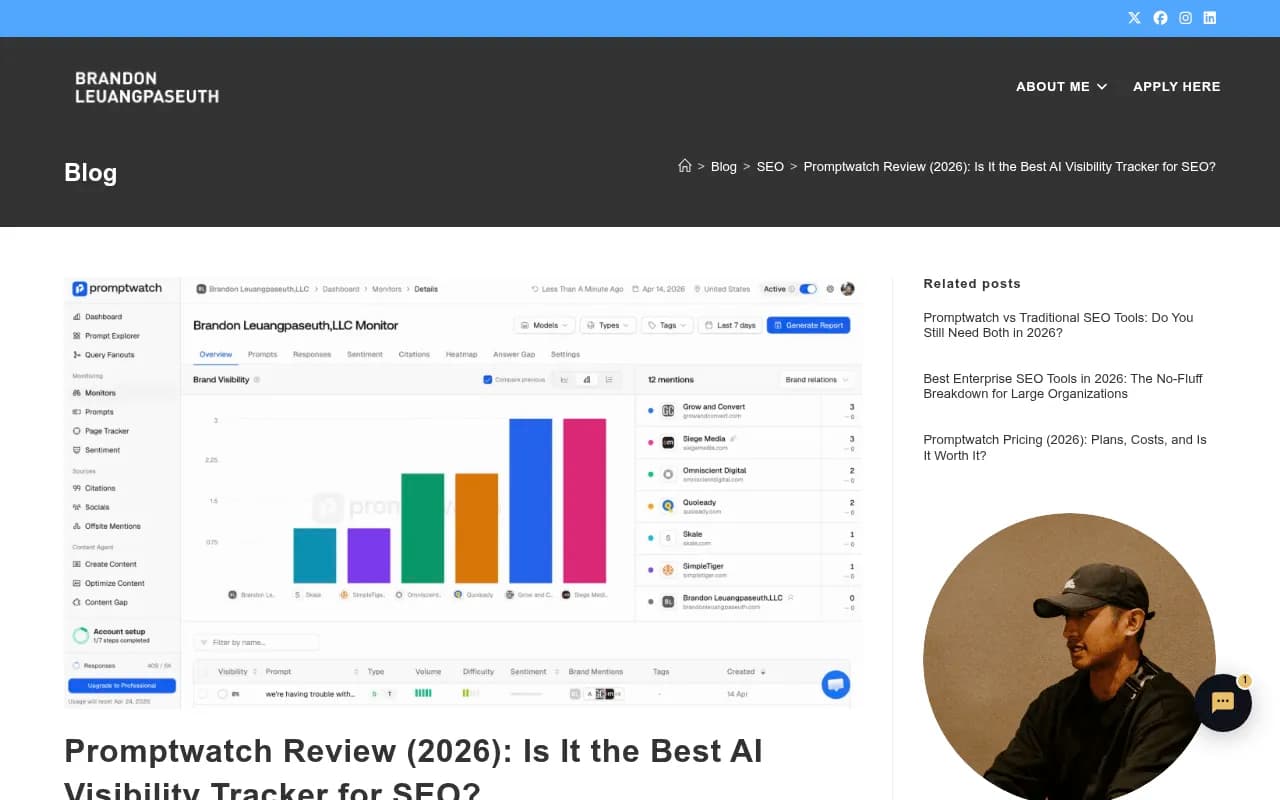
The first report to look at is the Visibility Score — your overall share of voice across all tracked prompts and models. Don't panic if it's low. Most brands start with a visibility score well below what they'd like. The number matters less than the trend over time.
The second report is the Citation & Source Analysis. This shows you which of your pages are actually being cited, and which competitor pages are getting cited instead of yours. This is where you start to see the content gaps.
The third is the Answer Gap Analysis — Promptwatch's most distinctive feature. This report shows you the specific prompts where competitors are visible but you're not. It's not just "you're missing here" — it shows you what content would need to exist on your site for AI models to start citing you for those prompts.
Step 8: Close the loop with content creation
Tracking without acting is just an expensive dashboard habit.
Once you've identified gaps from the Answer Gap Analysis, the next step is creating content that fills them. Promptwatch has a built-in AI writing agent that generates articles, listicles, and comparison pages grounded in citation data — it knows which content formats tend to get cited by which models, and it uses that to inform what it produces.
This is the part of the workflow that separates Promptwatch from monitoring-only tools. Platforms like Otterly.AI or Peec.ai will show you that you're invisible for certain prompts. Promptwatch shows you that, then helps you do something about it.


The content generation workflow:
- Pick a prompt from your Answer Gap report where a competitor is visible but you're not
- Use the AI writing agent to generate a draft article targeting that prompt
- Review, edit, and publish to your site
- Watch your visibility score for that prompt over the following 2-4 weeks
Results aren't instant. LLMs update their knowledge on different schedules, and some (like ChatGPT's browsing-enabled responses) pick up new content faster than others. Give it at least 30 days before concluding a piece of content isn't working.
Comparing your setup options
If you're evaluating whether Promptwatch is the right tool for this workflow, here's how it compares to some alternatives on the key capabilities this guide covers:
| Capability | Promptwatch | Otterly.AI | Peec.ai | AthenaHQ | Profound |
|---|---|---|---|---|---|
| Multi-model monitoring | 10 models | Limited | Limited | 8+ models | Yes |
| Persona-based tracking | Yes | No | No | No | Limited |
| AI crawler logs | Yes | No | No | No | No |
| Traffic attribution | Yes (3 methods) | No | No | No | Limited |
| Answer gap analysis | Yes | No | No | No | Limited |
| Built-in content generation | Yes | No | No | No | No |
| Reddit/YouTube tracking | Yes | No | No | No | No |
| ChatGPT Shopping tracking | Yes | No | No | No | No |


The pattern is consistent: most tools in this space are monitoring dashboards. They show you data. Promptwatch is built around the full cycle of finding gaps, creating content, and tracking whether it worked.
Common setup mistakes to avoid
Tracking only branded prompts. If you only monitor prompts that include your brand name, you'll miss the majority of AI search activity. Most people discovering new products through AI don't already know your brand name — that's the whole point.
Setting it and forgetting it. AI search visibility changes as models update, competitors publish new content, and your own site evolves. Check your dashboard at least weekly and review your prompt set monthly.
Ignoring the crawler logs. The gap between "AI crawlers visit this page" and "AI models cite this page" is where most optimization opportunities hide. Don't skip this step.
Expecting overnight results. AI models don't update in real time. New content you publish today might not appear in LLM responses for weeks. Build a 60-90 day timeline into your expectations.
Not connecting attribution. Without the traffic attribution setup, you're flying blind on ROI. You'll know your visibility score is improving but won't be able to connect it to business outcomes. Do the 10-minute snippet install on day one.
What good looks like after 90 days
A well-configured Promptwatch setup after 90 days should give you:
- A clear visibility score trend (ideally improving) across your core prompts and models
- A list of pages that are actively being cited, with click data attached
- A prioritized backlog of content gaps to address, ranked by prompt volume and competitive difficulty
- Traffic attribution data showing which AI sources are sending visitors and what those visitors do on your site
- Crawler log data showing which AI engines are actively reading your content
That's not a vanity dashboard. That's a system that tells you where to invest your content budget and whether it's working.
The brands that figure this out in 2026 will have a meaningful advantage. The ones that wait until AI search traffic is undeniable will be playing catch-up against competitors who've already built the content library and the citation history.
Start the setup today. The data compounds over time — the longer your monitor runs, the more useful the trend data becomes.