Canva AI Review 2026
Canva's suite of AI tools includes text-to-image generation, Magic Write for copy, and design suggestions -- all built into its visual design platform.
Key takeaways
- Canva AI is not a standalone AI image tool -- it's a suite of AI features embedded inside Canva's broader design platform, which means you get generation and editing in one place
- Magic Media handles text-to-image and text-to-video; Dream Lab adds reference-image-based generation with style transfer
- The free tier is genuinely usable but limited -- serious users will hit the generation cap quickly and need Canva Pro ($15/mo)
- Not a professional AI image tool: output quality lags behind Midjourney or Stable Diffusion for complex prompts, but the workflow integration is hard to beat for non-technical users
- Best suited for social media managers, small business owners, and content creators who already live inside Canva
Canva launched as a drag-and-drop design tool in 2013, built on the premise that non-designers should be able to produce professional-looking graphics without touching Photoshop. Over the past decade it's grown into one of the most widely used design platforms on the planet, with over 170 million monthly active users as of 2024. The AI features -- collectively marketed under the "Magic Studio" umbrella -- arrived in earnest around 2023 and have been expanding steadily since.
The AI image generator specifically lives at the intersection of two things Canva does well: lowering the barrier to entry and keeping everything inside one tool. You don't need to generate an image in Midjourney, download it, upload it to Canva, and then resize it. You generate it directly in the editor, drop it into your design, and keep moving. For a certain type of user, that workflow advantage outweighs the quality gap with dedicated AI image tools.
The target audience is broad but skews toward non-technical creatives: social media managers at small businesses, solo entrepreneurs building their own brand assets, teachers making classroom materials, and content creators who need a steady stream of custom visuals without a design budget. It's less suited to professional illustrators or developers who want API access and fine-grained control over model parameters.
Key features
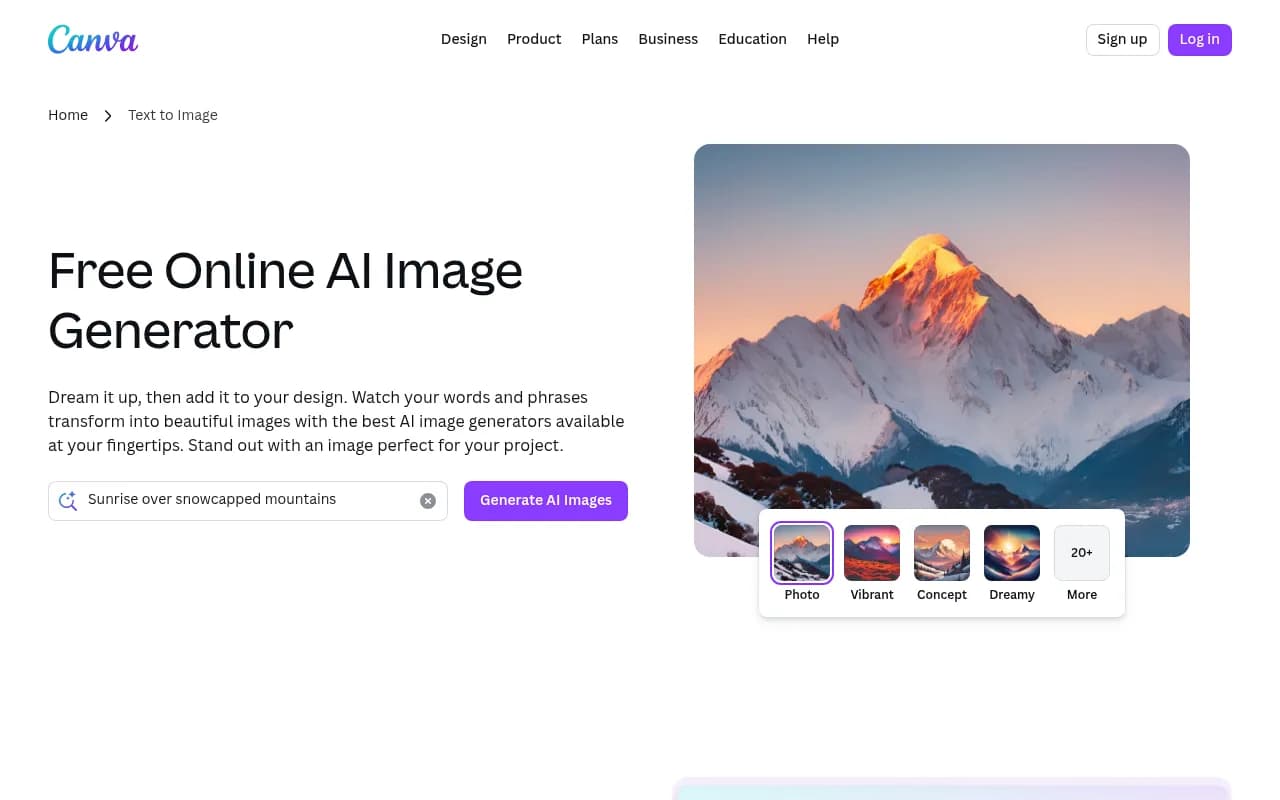
Magic Media -- Text to Image The core image generation feature. You type a prompt, optionally select a style (Watercolor, Filmic, Neon, Color Pencil, Retrowave, Dreamy, Vibrant, Concept, Photo, and 20+ more), choose an aspect ratio, and Canva generates four image options. The style selector is genuinely useful -- it gives non-technical users a way to steer the output without writing complex prompt modifiers. Quality is solid for simple subjects and lifestyle imagery, but detailed scenes with multiple characters or specific architectural elements can produce inconsistent results. The underlying model isn't disclosed publicly, which makes it harder to benchmark against alternatives.
Dream Lab -- reference-image generation This is the more interesting of the two image tools. You upload a reference image, describe what you want, and Dream Lab generates new images that preserve the aesthetic, texture, or composition of your reference. It's useful for brand consistency -- if you have a specific visual style you want to replicate across assets, you can use an existing piece as a style anchor. The tool also supports AI-powered prompt refinement and upscaling for higher-resolution output. Compared to something like Adobe Firefly's style reference feature, Dream Lab is more accessible but less precise.
Magic Media -- Text to Graphic Generates icons, stickers, illustrations, and graphics from text prompts rather than photorealistic images. This is particularly useful for UI mockups, presentation decks, and social posts where you need a custom icon or illustration that matches a specific theme. The output tends to be cleaner and more usable than the photorealistic generator for these use cases.
Magic Media -- Text to Video Type a prompt, get a short AI-generated video clip. The clips are brief (a few seconds) and the quality is roughly on par with early-generation text-to-video tools -- useful for social media filler content or animated backgrounds, not for anything that needs to look polished. You can apply filters and transitions after generation.
Magic Edit A Pro-tier feature that lets you edit existing images using text prompts. Select a region of an image, describe what you want to change, and Magic Edit replaces or modifies that area. It works reasonably well for background swaps and object replacements, though complex edits with fine detail (faces, hands, text) can produce artifacts. It's comparable to Adobe Firefly's generative fill, though Firefly generally produces cleaner results on difficult edits.
Magic Eraser One-click object removal. Select an unwanted element in a photo and Magic Eraser fills the gap with generated background content. It's a Pro feature and works well on simple backgrounds (sky, grass, solid colors). Complex backgrounds with patterns or crowds are hit-or-miss.
Magic Write Canva's AI copywriting tool, built into Canva Docs and the design editor. You can generate headlines, captions, social media copy, and longer-form text directly inside your design. It's powered by a large language model (likely GPT-based, though Canva doesn't confirm this) and produces competent marketing copy. It's not a replacement for dedicated writing tools like Jasper or Copy.ai, but for someone who just needs a caption for an Instagram post they're already designing, it removes a context switch.
Magic Design Upload an image or describe a concept, and Magic Design generates a full design template -- layout, typography, color scheme, and all. It's genuinely impressive for getting a starting point fast. The output isn't always production-ready, but it's a useful starting point that you then customize.
Background Remover One-click background removal, available on Pro. Works well for product photos and headshots with clear subject-background separation. Struggles with hair, fur, and complex edges -- similar limitations to most automated background removal tools.
Safety and content moderation Canva has automated prompt filtering in place to block requests for inappropriate content. Users can report problematic outputs directly from the editor. The system is fairly conservative -- some legitimate creative prompts get flagged -- but it's appropriate for a platform with a broad user base that includes minors.
Who is it for
The clearest use case is the social media manager or content creator who produces a high volume of visual content on a tight schedule. Someone managing Instagram, LinkedIn, and Pinterest for a small business needs a constant stream of custom images, and Canva AI lets them generate, edit, and publish without leaving the platform. The workflow compression is real: generate an image, drop it into a template, add text with Magic Write, schedule it with the Content Planner (Pro), all in one tab.
Small business owners and entrepreneurs who can't afford a designer or a stock photo subscription also fit well here. The free tier gives them enough to experiment, and Pro at $15/month is accessible. For someone who would otherwise spend hours on Unsplash looking for a photo that doesn't quite fit, or paying $50+ for a custom illustration, Canva AI is a practical alternative.
Teachers, educators, and non-profit communicators are another strong fit. Canva has long been popular in education, and the AI tools extend that accessibility. Generating custom illustrations for a classroom presentation or a fundraising flyer is genuinely easy.
Who should look elsewhere: professional illustrators and photographers who need precise control over output, developers who want API access to build AI image generation into their own products, and anyone whose primary need is high-resolution, photorealistic imagery for print or advertising. For those use cases, Midjourney, Stable Diffusion, or Adobe Firefly are better choices. Canva AI is a convenience tool, not a professional image generation platform.
Integrations and ecosystem
Canva's integration story is primarily about what's already inside the platform rather than external connections. The AI tools are embedded in the editor, so they work alongside Canva's existing library of 100+ million stock photos, icons, and templates.
External integrations worth noting:
- Social media publishing: Direct scheduling to Instagram, Facebook, Twitter/X, LinkedIn, Pinterest, TikTok, and Slack via the Content Planner (Pro)
- Google Drive and Dropbox: Import and export files directly
- Google Workspace: Canva for Google Workspace lets you use Canva inside Google Docs, Slides, and Gmail
- Microsoft Teams and PowerPoint: Export to PPTX or present directly in Teams
- Zapier: Automate workflows connecting Canva to other tools, though the integration is limited compared to dedicated automation platforms
- Canva for Education and Canva for Nonprofits: Free Pro access for qualifying organizations
There's no public API for the AI image generation features specifically. Canva does have a Connect API for enterprise customers, but it's focused on design automation (creating designs programmatically from templates) rather than exposing the AI generation models. This is a meaningful limitation for developers.
Mobile apps are available for iOS and Android, and the AI features are accessible on mobile, though the experience is more limited than the desktop web editor. The browser-based editor works across all major browsers without installation.
Pricing and value
Canva's pricing structure is straightforward:
- Free: Access to Magic Media (Text to Image, Text to Graphic, Text to Video) and Magic Write with a shared monthly allowance. The exact number of generations isn't published cleanly, but free users report hitting limits within moderate use. Background Remover, Magic Edit, Magic Eraser, and Dream Lab are not available on Free.
- Canva Pro: $15/month per person (or ~$120/year). Unlocks the full AI feature set including Dream Lab, Magic Edit, Magic Eraser, Background Remover, and higher generation limits. Also includes 1TB storage, Brand Kit, Content Planner, and premium templates. This is where the AI tools become genuinely useful for regular use.
- Canva Teams: $10/person/month (minimum 3 people, billed annually). Adds collaborative brand controls, team template locking, and admin features. AI allowances are shared across the team.
- Canva Enterprise: Custom pricing. Adds SSO, advanced brand controls, dedicated support, and higher limits.
For comparison, Midjourney starts at $10/month for ~200 image generations and goes up to $60/month for unlimited. Adobe Firefly is included in Creative Cloud subscriptions starting at $60/month. Canva Pro at $15/month is a strong value proposition if you're already using Canva for design work -- the AI features are essentially bundled in. If you only want AI image generation and don't need the design platform, there are cheaper or more capable dedicated options.
Strengths and limitations
What it does well:
- Workflow integration: Generating an image and immediately using it in a design, without any file management, is genuinely faster than any multi-tool workflow. This is Canva AI's clearest advantage.
- Accessibility: The style selector and simple prompt interface make AI image generation approachable for users who have never written a Midjourney prompt. The learning curve is minimal.
- Breadth of AI tools: Text to Image, Text to Graphic, Text to Video, Magic Edit, Magic Eraser, Magic Write, Magic Design, Background Remover, and Dream Lab -- all in one subscription. No other single platform at this price point covers this much ground.
- Dream Lab's reference-image feature: Style transfer from a reference image is a genuinely useful capability for brand consistency, and it's more accessible here than in most alternatives.
- Safety and moderation: For teams and educational settings, Canva's content moderation is a feature, not a limitation.
Honest limitations:
- Image quality ceiling: For complex, detailed, or highly specific prompts, Canva's output quality falls short of Midjourney v6 or DALL-E 3. Faces, hands, and intricate scenes are where the gap is most visible.
- No API for AI features: Developers can't access the image generation models programmatically, which rules out any custom integration or automation beyond what Canva's own tools support.
- Generation limits are opaque: Canva doesn't publish clear numbers for how many generations you get per month at each tier. Users have to discover limits by hitting them, which is frustrating for planning purposes.
- No fine-tuning or model customization: You can't train on your own images or adjust model weights. What you see is what you get, which limits professional use cases.
Bottom line
Canva AI makes the most sense for users who are already in the Canva ecosystem and want to add AI-generated visuals to their design workflow without switching tools. The combination of accessible image generation, solid editing tools, and a full design platform in one subscription is hard to match at $15/month.
For anyone whose primary need is the highest-quality AI image output, or who wants API access and model control, dedicated tools like Midjourney or Adobe Firefly are the better choice. But for the social media manager, small business owner, or content creator who lives in Canva anyway, the AI features are a natural and practical extension of what they're already doing.
Best use case in one sentence: Canva AI is the right choice for non-technical creatives who need AI-generated images they can immediately use in a design, without managing multiple tools or subscriptions.
Frequently asked questions
What is Canva AI?
Is Canva AI free to use?
How does Canva AI compare to Midjourney or Adobe Firefly?
What is Dream Lab in Canva?
Can I use Canva AI-generated images commercially?
Who is Canva AI best suited for?
Similar and alternative tools to Canva AI