Vyond Review 2026
Cloud-based animated video platform for creating professional business animations, explainer videos, and eLearning content without needing design or animation skills.
Key takeaways
- Vyond is one of the most established business animation platforms on the market, used by 65% of the Fortune 500 including Amazon, Microsoft, Google, and Disney
- The platform has evolved well beyond basic animation -- it now includes AI-generated video, photorealistic styles, text-to-video (Vyond Go), AI avatars, screen recording, and instant translation
- Best fit for L&D teams, HR departments, and corporate communications teams at mid-size to enterprise companies who need video at scale without hiring a production studio
- Pricing starts at $100/user/month (billed annually at $1,199/year), which is on the higher end compared to some newer AI video tools
- The learning curve for the full Vyond Studio editor is real -- it's more capable than tools like Canva Video, but that capability comes with complexity
- Not the right tool for solo creators or small teams on tight budgets; the per-user pricing adds up fast for larger teams
Vyond started life as GoAnimate back in 2007, rebranding to Vyond in 2018 to better reflect its enterprise focus. What began as a relatively simple drag-and-drop cartoon maker has grown into a full AI video creation platform that handles everything from classic 2D animation to photorealistic video, generative AI styles, screen recordings, and webcam capture -- all in one browser-based editor. The company's claim that 65% of Fortune 500 companies rely on it is hard to ignore, with logos like Fidelity, Home Depot, Roche, Allstate, and American Express on the customer list.
The core problem Vyond solves is a real one: most organizations need video content constantly -- for training, onboarding, compliance, sales enablement, internal comms -- but professional video production is expensive and slow. Vyond lets non-designers produce professional-looking videos in hours rather than weeks, without needing to hire animators or video editors.
The target audience is primarily corporate. L&D professionals, instructional designers, HR teams, and marketing departments at companies with 200+ employees are the sweet spot. This isn't a tool aimed at YouTubers or social media creators, even though it can technically serve those use cases. The enterprise-grade security certifications (SOC 2, GDPR compliance) and SSO support make it viable for organizations with strict IT requirements -- something competitors like Animaker or Powtoon can't always match.
Key features
Vyond Go (text-to-video) is the platform's most significant recent addition. You give it a text prompt, upload a document (PDF, Word, PowerPoint), or drop in a URL, and it generates a complete video with scenes, narration, and visuals. The output isn't just a slideshow with voiceover -- it produces actual animated scenes with characters and backgrounds. In practice, the results vary depending on how structured your input is, but for explainer videos and training content, it's genuinely fast. The preset options (Product Launch, Event Promo, Explainer Video) help guide the AI toward appropriate formats.
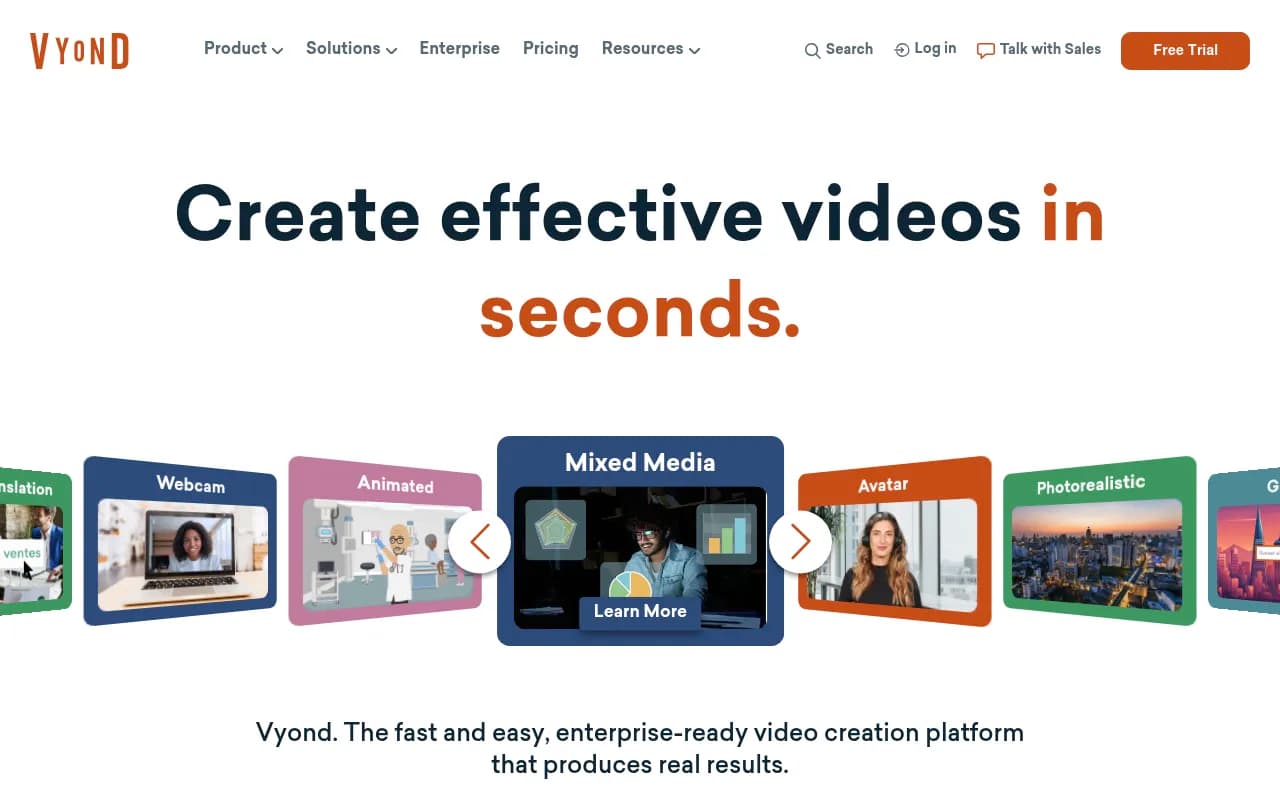
AnyStyle video creation is what Vyond calls its multi-format approach. Within a single platform you can create:
- Traditional 2D animated videos with characters, props, and backgrounds
- Photorealistic video that looks closer to live-action footage
- Generative AI video using diffusion-style visuals
- Screen recordings for software tutorials and demos
- Webcam recordings for talking-head content
- Mobile capture for on-the-go video creation
- Mixed media that combines any of the above
This is genuinely unusual. Most competitors specialize in one style. Being able to mix a screen recording with animated characters in the same video is useful for software training content.
AI avatars give you a library of digital presenters you can use instead of recording yourself. You type a script, pick an avatar, and it generates a lip-synced presenter video. The avatar selection covers different ethnicities, ages, and presentation styles. This is useful for organizations that want consistent on-camera presenters without scheduling real people. The quality is comparable to tools like Synthesia, though Synthesia has a larger avatar library and more customization options for custom avatar creation.
Instant translation automatically translates your video's audio and on-screen text into other languages. For global organizations running the same compliance training in 15 countries, this is a significant time saver. The feature handles both the voiceover (via AI voice synthesis) and the text elements within the video.
The Vyond Studio editor is the full-featured timeline-based editor for users who want more control. You get a scene-based timeline, a library of thousands of characters, props, backgrounds, and music tracks, plus the ability to import your own assets. Characters can be customized extensively -- skin tone, hair, clothing, accessories -- which matters for creating diverse, representative training content. The editor supports lip-sync animation tied to uploaded audio or text-to-speech.
Template library covers the major use cases: eLearning, presentations, storytelling, marketing, HR, and social media. Templates are fully editable and come with pre-built character scenes, transitions, and music. For teams that need to produce a lot of similar content (monthly compliance updates, weekly sales training), templates dramatically reduce production time.
Enterprise security and administration includes SSO, SCIM provisioning, SOC 2 Type II compliance, and admin controls for managing users and brand assets across an organization. This is where Vyond genuinely differentiates from cheaper alternatives -- the IT and security requirements of a Fortune 500 company are not trivial, and Vyond has invested in meeting them.
Brand kit and asset management lets enterprise teams lock down fonts, colors, logos, and approved assets so that videos produced across a large team stay on-brand. This is more important than it sounds when you have 50 people in different departments all creating training videos.
Who is it for
The primary user is an instructional designer or L&D specialist at a company with a dedicated training function. Think someone at a 500-person insurance company who needs to produce 20 compliance training videos per year, or a learning designer at a university who creates course content for online programs. Vyond's character library, scene-based editor, and eLearning templates are clearly built with this person in mind. The testimonials from Shelter Insurance, Rentokil Terminix, Michigan State University, and the Illinois Courts all point to the same profile.
HR and internal communications teams are the second major audience. Onboarding videos, policy explainers, benefits enrollment guides -- these are all content types that HR teams need regularly but rarely have budget for professional production. Vyond's templates for HR content and the ability to quickly update existing videos (change a date, swap a character, update a policy detail) make it practical for ongoing use rather than one-off projects.
Marketing teams at mid-size B2B companies are a third use case, particularly for explainer videos and sales enablement content. A SaaS company that needs to explain a complex product feature to prospects, or a financial services firm that needs animated explainers for their website, fits here. That said, marketing teams with strong design sensibilities sometimes find Vyond's aesthetic a bit corporate and templated compared to custom animation.
Solo creators, freelancers, and small businesses should probably look elsewhere. The $100/user/month entry price is hard to justify for occasional use, and tools like Canva, Adobe Express, or even newer AI video tools offer more accessible pricing for lighter needs. Similarly, companies that need highly custom, brand-specific animation styles may find Vyond's template-driven approach limiting.
Integrations and ecosystem
Vyond's integration story is functional but not extensive. The platform connects with:
- LMS platforms: Videos can be exported as MP4 files or SCORM packages for upload to any LMS (Cornerstone, Workday Learning, SAP SuccessFactors, etc.). There's no native LMS integration via API, but SCORM export covers most enterprise needs.
- PowerPoint: You can import PowerPoint slides into Vyond to use as a starting point for video creation, which is useful for converting existing training decks.
- Google Slides: Similar import capability for Google Slides users.
- Articulate and Adobe Captivate: Vyond videos are commonly embedded in Articulate Storyline and Rise courses, though this is done via MP4 export rather than a direct integration.
- SSO providers: SAML-based SSO works with Okta, Azure AD, and similar enterprise identity providers.
- API: Vyond offers an API for enterprise customers, enabling programmatic video creation and management. This is useful for organizations that want to automate video production at scale (e.g., generating personalized training videos from an HR system).
There's no native Slack, Zapier, or HubSpot integration out of the box, which is a gap compared to some newer tools. The mobile app situation is limited -- Vyond Go has mobile capture capability, but the full Studio editor is browser-based and not optimized for mobile editing.
Pricing and value
Vyond's pricing is straightforward but not cheap:
- Professional: $100/user/month, billed annually at $1,199/year. Includes 10,000 AI credits per user per month, access to the full template library, Vyond Go, AI avatars, and standard export options.
- Enterprise: Custom pricing. Adds SSO, SCIM, advanced admin controls, brand kit management, dedicated support, and API access.
There's a free trial available (no credit card required based on the signup flow), which gives you enough time to evaluate the editor and produce a test video.
Compared to competitors: Animaker starts around $35/month, Powtoon around $50/month, and Synthesia (for AI avatar-focused video) starts around $29/month. Vyond is more expensive than all of them at the entry level. The justification is the breadth of features, the enterprise security posture, and the depth of the character and asset library. For a team of 5 L&D professionals, you're looking at $6,000/year -- that's real money, but it's still a fraction of what professional video production would cost for the same volume of content.
The per-user model can get expensive for larger teams. A 20-person L&D department would pay $24,000/year at the Professional tier, at which point the Enterprise tier with custom pricing likely becomes more economical.
Strengths and limitations
What Vyond does well:
- The breadth of video styles in one platform is genuinely impressive. Animated, photorealistic, generative AI, screen recording, webcam, mixed media -- no other single tool covers this range as cleanly.
- Enterprise security and compliance credentials are real and matter for large organizations. SOC 2 Type II, GDPR, SSO, SCIM -- these aren't marketing checkboxes, they're requirements for IT approval at big companies.
- The character customization and diversity options in the animated style are among the best in the category. Creating characters that reflect your actual workforce is important for training content, and Vyond's library is extensive.
- Vyond Go's text-to-video and document-to-video features are genuinely fast for producing first drafts of explainer and training content. Not perfect, but a solid starting point.
- Customer retention appears strong -- the testimonials from Indeed ("I'm a loyal customer") and others suggest the platform delivers enough value to keep enterprise customers renewing.
Limitations and honest gaps:
- The per-user pricing model is expensive for teams that need broad access. If you want 50 employees to occasionally create videos, the cost becomes prohibitive.
- The Vyond Studio editor has a learning curve. It's not as immediately intuitive as Canva or newer AI-first tools. New users typically need a few hours of tutorials before they're productive.
- Custom avatar creation (using your own face/likeness) is less developed than dedicated tools like Synthesia or HeyGen, which have made custom AI avatars a core product feature.
- The generative AI video quality, while improving, still lags behind dedicated AI video generation tools like Runway or Sora for cinematic or highly creative output. Vyond's AI video is optimized for business communication, not creative filmmaking.
- No native integrations with common marketing or communication tools (Slack, HubSpot, Salesforce) limits its usefulness for marketing teams who want video embedded in their existing workflows.
Bottom line
Vyond is the right choice for L&D teams, HR departments, and corporate communications functions at mid-size to large organizations that need to produce a high volume of professional training and explainer videos without a production team. The combination of enterprise security, a deep asset library, multiple video styles, and AI-powered creation tools makes it the most complete platform in its category for business use.
The best single use case: an instructional designer at a 1,000-person company who needs to produce 30+ training videos per year across compliance, onboarding, and skills development -- Vyond gives them everything they need in one place, at a cost that's still well below hiring a video production agency.
Frequently asked questions
What is Vyond?
How much does Vyond cost?
Who uses Vyond?
How does Vyond compare to Synthesia or Animaker?
Does Vyond have a text-to-video feature?
Is Vyond good for small businesses or freelancers?
Similar and alternative tools to Vyond