Key takeaways
- No single WordPress plugin does everything. Some log AI crawler hits, some count human visits from AI answers, and a few only log requests to their own files.
- Airefs is the plugin that covers both halves: server-side crawler visits ("Impressions") and human AI-referred visits ("Clicks"). It needs a free external account.
- LLM Bot Tracker by Hueston logs bot hits across the whole site and stores data locally, but it tracks crawlers only, not human visitors.
- PHP-level logging only sees requests that reach WordPress. Page caches and CDN edges can hide bot hits, and user agents can be faked.
- Logs are only useful if you can compare them to a baseline, and if crawlers are not already blocked in robots.txt, CDN, or WAF rules.
What "capturing AI crawler logs" really means
Two different things get lumped together under this phrase, and mixing them up is how people end up with the wrong plugin.
The first is crawler logging: a bot such as GPTBot or PerplexityBot requests a page, and something records the bot name, URL, timestamp, and status code. The second is referral tracking: a human reads an AI answer, clicks a citation, and lands on your site. Different mechanism entirely. Crawler logging happens on the server. Referral tracking usually relies on a browser script or referrer data.
WordPress can't tell you either by default. Standard analytics tools run JavaScript, and bots mostly don't execute it. So a crawler can read 200 pages and never show up in your dashboard.
The plugins worth knowing about
The research for this guide turned up several WordPress options. They solve different problems.
| Plugin | Logs crawlers | Tracks human AI visits | Coverage | Data stored |
|---|---|---|---|---|
| Airefs | Yes (requests handled by PHP) | Yes (browser script) | Whole site, subject to caching | External account (Tinybird, AWS EU) plus local queue |
| LLM Bot Tracker (Hueston) | Yes, 59 bots listed | No | Every request that reaches WordPress | Local database |
| AI Discovery Files | Yes, 43 crawlers in 8 operator groups | No | Only its 10 discovery files | Local database, 90-day default retention |
| JetGEO (Crocoblock) | Yes, crawler logs and analytics | Not documented | Crawler control plus llms.txt, Markdown, robots.txt | Not verified |
| Frizerly | Positioned as tracking plus content automation | Claims referral tracking | Not verified | Not verified |
I could not verify pricing for Airefs, JetGEO, or Frizerly, so check each plugin page before you commit. The Frizerly comparison post is also written by Frizerly itself, which means its ranking of itself first deserves a pinch of salt.
Airefs: the plugin that does both halves
If your question is literally "which WordPress plugin captures AI crawler logs and AI-referred visitors," Airefs is the closest match in the research.
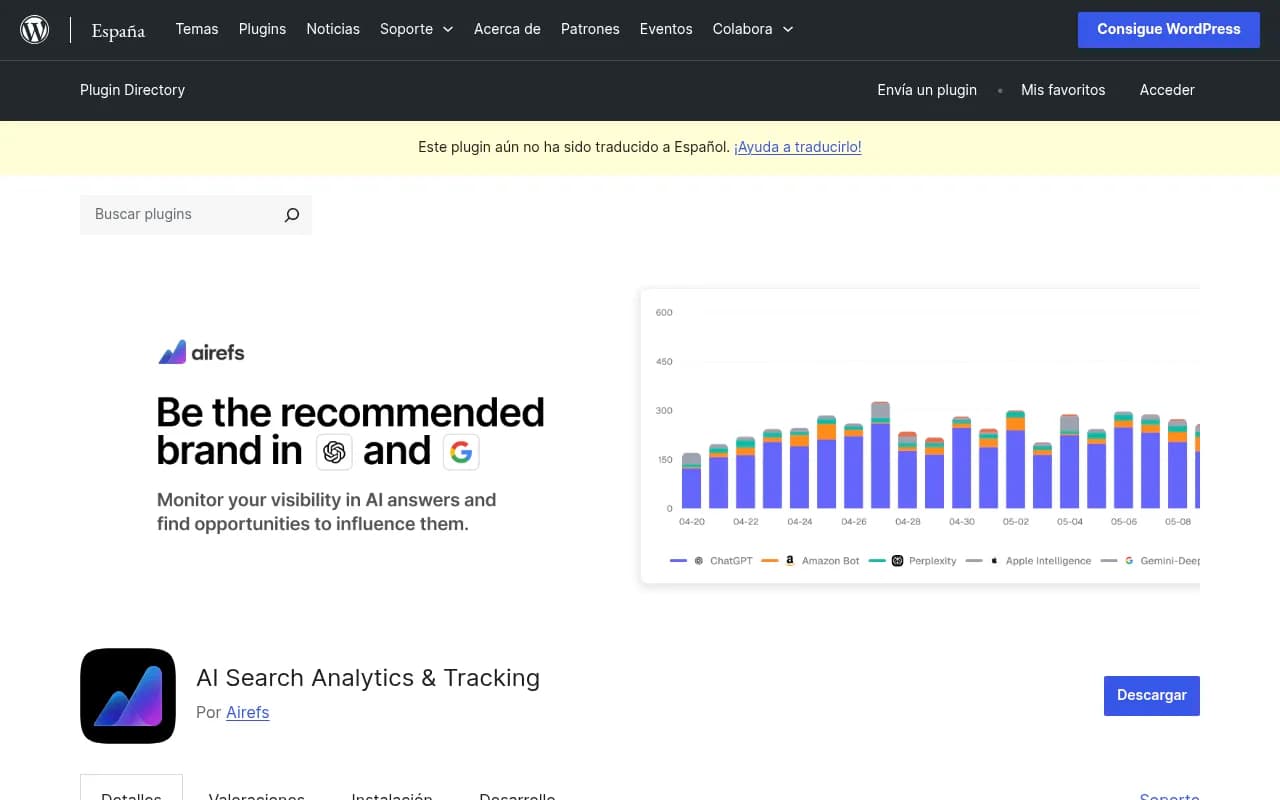
It has two features.
Impressions: crawler visits
Impressions are server-side AI crawler visits. The plugin captures them only from "requests handled by PHP," which means requests that actually reach WordPress. Each record holds the bot identity, IP address, page path, timestamp, and HTTP status. A "user searches only" filter separates fetches triggered by a person asking an AI a question from background crawls.
The dashboard groups visits by AI system and page, so you can see which content bots read most.
Clicks: human visits from AI answers
Clicks use a script loaded in the site footer. Attribution covers ChatGPT, Perplexity, Claude, Gemini, Copilot, and Meta AI. You get bar charts by platform, a referrers table, a pages table, and windows of 7, 30, 90, and 180 days.
Setup, step by step
- Install and activate the plugin from the WordPress directory.
- Create a free account at app.getairefs.com.
- Copy the Access Token from the Airefs Settings page.
- In WordPress, go to Settings, then Airefs Tracking, paste the token, and save.
- Wait. Data typically appears within one to two days, and crawler data depends on when bots actually show up.
Airefs limits to know before you install
- External account required. Analytics are processed in Tinybird and stored on AWS servers in the EU. Sign-up runs on Convex and delivery on Cloudflare. If your legal team cares about data processors, that is four names to list.
- Local queue. Events are batched and sent through WP-Cron. The queue holds visitor IPs, user agents, and session IDs until delivery is confirmed. Pending events never expire, so during an outage or while tracking is paused they can sit there indefinitely. Deleting the plugin removes the queue. Deactivating it does not.
- Cookie. It sets a first-party airefs_session_id cookie. That is a consent question in many jurisdictions, so talk to whoever owns your cookie banner.
- Privacy handling. The API anonymizes non-bot IP and user-agent values. Bot records may keep them.
- Query strings. The p and page_id parameters are preserved, up to 16 custom content parameters can be configured, UTM parameters are kept as attribution fields only, and fragments and other parameters are stripped. Referrers keep only origin and path.
- Overhead. The plugin does not promise zero overhead. Fair enough, and better than a claim of none.
- Caching. The FAQ answer about caching plugins was cut off in my research, so I can't tell you what it says. Read it yourself before relying on the numbers on a heavily cached site.
LLM Bot Tracker: site-wide, local, crawlers only
LLM Bot Tracker by Hueston takes a different approach. It logs every request, not just specific files, and keeps everything in your own database with no external API calls.
What you get: timestamp, bot, page, IP, geo, and response code. There are filters by bot, date, path, and IP, CSV export, bulk actions, a 30-day trend view, a top-bots leaderboard, IP-lookup bot verification, and automatic log rotation. You view it under Tools, then LLM Crawler Logs. A set of shortcodes (such as [wpcs_llm_stats] and [wpcs_llm_last100]) lets you display stats on a page.
The listing is inconsistent about the bot count: the title says 56, the description says 59. Its "under 0.01s" overhead figure is self-reported, and the success stories on the page are unverified marketing. I would not quote any of them.
The real limit: it tracks crawlers only. Nothing in the description mentions human referral tracking. Pair it with GA4 or a referral plugin if you want the other half. It also has a configuration tab with "smart cache detection," which tells you the author knows caching can hide bot hits.
AI Discovery Files: great logger, narrow scope
The AI Discovery Files plugin publishes llms.txt plus nine other files, then logs bots that request them. Its logger checks the user agent against 43 AI crawlers across 8 operator groups and writes one row per match: which bot, which file, when, and what status code.
Because the plugin serves those URLs itself, it works behind a CDN for those files. It is off by default, prunes rows daily with a retention default of 90 days (minimum 30), and has a dashboard widget.
The author is blunt about the limit, and I appreciate that: the logger only sees requests to those ten files. If GPTBot crawls two hundred blog posts and never touches llms.txt, you see nothing. It is not site-wide analytics. The claims that it is free with no pro tier, and that it is tested against WordPress 7.0.2, are the author's own and I could not verify them.
JetGEO: control first, logs second
Crocoblock's JetGEO is mostly a control plugin. A setup wizard walks you through content visibility, llms.txt with dynamic tags, Markdown versions of content, robots.txt rules for AI crawlers, and crawler logs with analytics. You can allow or disallow specific crawlers and paths, with separate controls for AI search, assistants, and training.
It is a good fit if your main problem is deciding who gets in. I did not verify how its logs handle caching or whether it tracks human referrals.
The limits no plugin can fully fix
Caching and CDN edges
PHP-level logging sees what PHP serves. A request answered by a full-page cache or a CDN edge may never reach WordPress, so it never gets logged. I did not find a source that quantifies this for any specific plugin, so test it. Request a cached page with a bot user agent using curl, then check whether the log recorded it.
curl -A "GPTBot" -I https://yourdomain.com/some-cached-page/
If the row is missing, you have a blind spot. The fix is usually CDN-level logging rather than a better plugin.
Spoofed user agents
A user agent is self-declared. Anyone can send "GPTBot." The AI Discovery Files author says as much: treat bot names as claims, not proof, and verify by reverse DNS or the operator's published IP ranges. Most WordPress plugins match on user agent strings alone, with LLM Bot Tracker's IP lookup being a partial exception.
An incomplete bot list
The bot landscape moves fast. In Promptwatch Data's AI crawler traffic report, OpenAI made up 79.8% of IP-verified AI crawler requests in Aug 31 to Sep 6, 2026, down from 94.8% in Jun 8 to 14. And per Promptwatch's Meta-WebIndexer data, Meta-WebIndexer climbed from about 2.2% of tracked requests in mid-July to 37.8% on Aug 9, 2026. A plugin that doesn't list meta-webindexer, meta-externalagent, meta-externalfetcher, and FacebookBot would have missed a very large share of that traffic.
Check your plugin's registry against operators like these:
- OpenAI: GPTBot, OAI-SearchBot, ChatGPT-User, OAI-AdsBot
- Anthropic: ClaudeBot, Claude-User, Claude-SearchBot, claude-web
- Google: Google-Extended, Google-Agent
- Perplexity: PerplexityBot, Perplexity-User
- xAI, Mistral, Cohere, and DeepSeek bots such as GrokBot, MistralAI-User, cohere-ai, and DeepSeekBot
Meta's crawl volume also triggered load alerts on independent sites, so budget for sustained crawler load if you log every request.
Referrer data is shaky
Human AI-referred visits depend on referrer headers or script-side detection. I didn't find a source on how GA4 handles AI referrals, so don't assume your analytics tool is catching them. Note also that ChatGPT stopped sending a referrer on October 8, 2026, which means referrer-only detection undercounts it unless links carry a utm_source=chatgpt.com tag.
Check access before you read logs
A quiet log can mean bots don't care, or it can mean you're turning them away. Settle that first. Promptwatch's advice in its crawler report is the same: compare your own logs against the provider mix, and if a provider is big in the report but near zero in yours, you are likely blocked or unreachable. Check robots.txt, CDN, and WAF rules for each provider.
A common robots.txt pattern allows AI search crawlers and blocks training crawlers:
# Allow AI search crawlers (citations in AI answers)
User-agent: OAI-SearchBot
Allow: /

User-agent: Claude-SearchBot
Allow: /

User-agent: PerplexityBot
Allow: /

# Block AI training crawlers
User-agent: GPTBot
Disallow: /

User-agent: ClaudeBot
Disallow: /
If you have a physical robots.txt in your webroot, WordPress can't edit it, so plugin-generated rules have to be copied in by hand. For a quick test of what a bot can reach, the free AI Crawler URL Inspector and Robots.txt Generator for AI are handy.
A sensible setup order
- Audit access. Confirm robots.txt, CDN, and WAF rules aren't blocking the bots you want.
- Capture a baseline. Turn on logging before you change anything so later comparisons mean something.
- Pick the plugin for your question. Both crawler and human data: Airefs. Whole-site crawler logs kept local: LLM Bot Tracker. Control over access and files: JetGEO or AI Discovery Files.
- Test caching. Use the curl check above.
- Settle privacy. Document the cookie, the external processors, and your retention window.
- Wait two weeks. Crawlers move slowly. A week tells you almost nothing.
When a plugin stops being enough
Plugins are fine for a single WordPress site and a first look. They get awkward when you need verified bot identity, logs from a CDN edge, and a link between crawls, citations, and conversions.
Promptwatch covers that wider loop. Its AI crawler logs are IP-verified against each operator's published ranges so spoofed bots are filtered out, and setup runs through your CDN or host (Cloudflare, Vercel, Fastly, CloudFront and others) or its own official WordPress plugin, which also captures AI-referred visitors. It then ties crawls to citations and traffic, and the Action Board and Content Agent act on what the data shows.

If you just want a first read on how AI sees your site, the free AI visibility report needs no login. For lighter single-purpose trackers, DarkVisitors is also in the catalog.
More options for monitoring AI visibility are listed in the GEO software directory at bestgeosoftware.com.
Frequently asked questions
Will a logging plugin slow my site?
It depends on the plugin. Logging every request adds a database write per bot hit, and Airefs says outright it does not promise zero overhead. AI Discovery Files only writes rows for matching requests to its ten files, and logging is off until you enable it. Human page views shouldn't touch a bot logger at all, but test on staging.
Can I trust the bot names in the log?
Treat them as claims. A user agent string can be faked. Verify high-stakes entries with reverse DNS or published IP ranges.
Do I need both a crawler plugin and a referral plugin?
Only if your plugin does one half. Airefs covers both through Impressions and Clicks. LLM Bot Tracker and AI Discovery Files cover crawlers only.
Is crawling the same as being cited?
No. A bot reading your page doesn't mean an AI answer will cite it. Crawl logs tell you access happened. Citation and traffic data tell you whether it paid off.
Bottom line
For both crawler logs and AI-referred visitors in one WordPress plugin, start with Airefs and accept the trade-offs: an external account, a cookie, and a local queue. For local-only, site-wide bot logging, LLM Bot Tracker is the simpler choice. Whichever you pick, test it against a cached page and a spoofed user agent in the first week, because those are the two places every PHP-level logger quietly fails.